


The Geek Out


Post *****

Joined: December 14, 2007
Posts: 19,953
Likes: 4
From: State of Jefferson Mountains USA

Just Plain Rude!
Joined: February 1, 2004
Posts: 3,393
Likes: 18
From: Denton, TX
It's supposed to keep the connection stable. So if you start going out of Wi-Fi range, but you still barely pick up a signal, it'll switch over to data to keep a smooth connection. Whereas otherwise it won't switch to data until the Wi-Fi connection is completely out of range and disconnected.



Tasca Super Boss 429 Member
Joined: December 11, 2007
Posts: 7,575
Likes: 11
From: Uxbridge, MA
My computer monitor decide to not want to work any more. I've had this one for so long i'm trying to a crash course in finding a decent $150ish. Any suggestions of what to stay away from?
Just Plain Rude!
Joined: February 1, 2004
Posts: 3,393
Likes: 18
From: Denton, TX
If you just want a cheap monitor, you might check out a local University (if you have one nearby). The University where I work/attend surpluses them all the time and sells them to the public for $35/each.
Tasca Super Boss 429 Member
Joined: December 11, 2007
Posts: 7,575
Likes: 11
From: Uxbridge, MA
The one I have now is an HP W2007.
So many to choose from these days. I want a decent one but don't have the money to spend on it either.
IPS seems to be good, but they are slow. I'm not a game player so that isn't too much of an issue. Best Buy seems to have some equally priced IPS and LED so I will check them out after work today. This is something you need to see and just can't mail order. Most of the ones that get the good reviews on Best Buy's website are order online only. That sucks.
So my overtime money i'm making today will be spent faster than i'll be making it!
So many to choose from these days. I want a decent one but don't have the money to spend on it either.
IPS seems to be good, but they are slow. I'm not a game player so that isn't too much of an issue. Best Buy seems to have some equally priced IPS and LED so I will check them out after work today. This is something you need to see and just can't mail order. Most of the ones that get the good reviews on Best Buy's website are order online only. That sucks.
So my overtime money i'm making today will be spent faster than i'll be making it!
Tasca Super Boss 429 Member
Joined: December 11, 2007
Posts: 7,575
Likes: 11
From: Uxbridge, MA
I ended up getting a Lenovo 21.5 inch IPS monitor.
http://www.bestbuy.com/site/lenovo-2...&skuId=6036057
So far I like it. Nice bright white screen where my other one seemed to be on the yellowish side. The old one was a 20 inch, but the new one measures out 2 inches wider and the same height.
It's a little slow at 7ms response time, but i'm not a gamer, so it shouldn't really have any effect on me.
It's really hard to buy a monitor at Best Buy around here. The first store is a smaller one and not many on display. The ones they did have were not all the impressive. Then again, they have them playing a poor quality video rather than having them in a demo mode connected to a computer.
I went to the mall and checked out their set ups. More monitors, same crappy video playing on them. I don't see how they can sell monitors with such awful video playing on them. I was dissapointed again, but checked the monitors with the desktop systems. This Lenovo was in demo mode and looked great. I was sold, and only $149. Right in my price range, so home it came.
There was a 24 inch right next to if for $20 more, but sitting this close looking at something 19 inches wide is good enuff.
http://www.bestbuy.com/site/lenovo-2...&skuId=6036057
So far I like it. Nice bright white screen where my other one seemed to be on the yellowish side. The old one was a 20 inch, but the new one measures out 2 inches wider and the same height.
It's a little slow at 7ms response time, but i'm not a gamer, so it shouldn't really have any effect on me.
It's really hard to buy a monitor at Best Buy around here. The first store is a smaller one and not many on display. The ones they did have were not all the impressive. Then again, they have them playing a poor quality video rather than having them in a demo mode connected to a computer.
I went to the mall and checked out their set ups. More monitors, same crappy video playing on them. I don't see how they can sell monitors with such awful video playing on them. I was dissapointed again, but checked the monitors with the desktop systems. This Lenovo was in demo mode and looked great. I was sold, and only $149. Right in my price range, so home it came.
There was a 24 inch right next to if for $20 more, but sitting this close looking at something 19 inches wide is good enuff.
Tasca Super Boss 429 Member
Joined: December 11, 2007
Posts: 7,575
Likes: 11
From: Uxbridge, MA
That bezel in the pic is deceptive. The actual bezel is that thin, but the screen doesn't start lighting up until you're 3/8 of an inch in. So while the bezel is thin, there is a border. Sneaky.

Just Plain Rude!
Joined: February 1, 2004
Posts: 3,393
Likes: 18
From: Denton, TX
Do any of you guys use Python or PowerShell? I just finished my last project at work, which was creating a suitable replacement for BartPE. So now it's on to the next...
My next goals this semester are learning python, so I can recode some of our scripts to run on our (currently underutilized) Linux server. And learning PowerShell, because our software installation wrapper is mostly PowerShell and it's still sorta in development.
Does anyone have any good, tutorial-type sites that I should bookmark for those languages?
My next goals this semester are learning python, so I can recode some of our scripts to run on our (currently underutilized) Linux server. And learning PowerShell, because our software installation wrapper is mostly PowerShell and it's still sorta in development.
Does anyone have any good, tutorial-type sites that I should bookmark for those languages?

Shelby GT350 Member
Joined: December 16, 2011
Posts: 4,567
Likes: 1
From: Minnesota
Do any of you guys use Python or PowerShell? I just finished my last project at work, which was creating a suitable replacement for BartPE. So now it's on to the next...
My next goals this semester are learning python, so I can recode some of our scripts to run on our (currently underutilized) Linux server. And learning PowerShell, because our software installation wrapper is mostly PowerShell and it's still sorta in development.
Does anyone have any good, tutorial-type sites that I should bookmark for those languages?
My next goals this semester are learning python, so I can recode some of our scripts to run on our (currently underutilized) Linux server. And learning PowerShell, because our software installation wrapper is mostly PowerShell and it's still sorta in development.
Does anyone have any good, tutorial-type sites that I should bookmark for those languages?

Shelby GT350 Member
Joined: December 16, 2011
Posts: 4,567
Likes: 1
From: Minnesota

Mach 1 Member
Joined: January 12, 2012
Posts: 1,070
Likes: 13
From: Suburbs of Dallas
Guess I get to do some geek bragging.
Old PC bit the dust. Power supply failed and fried the motherboard along with it. Normally I would salvage what I could and replace only what I had to, but this time I decided to go all-in on a new build.
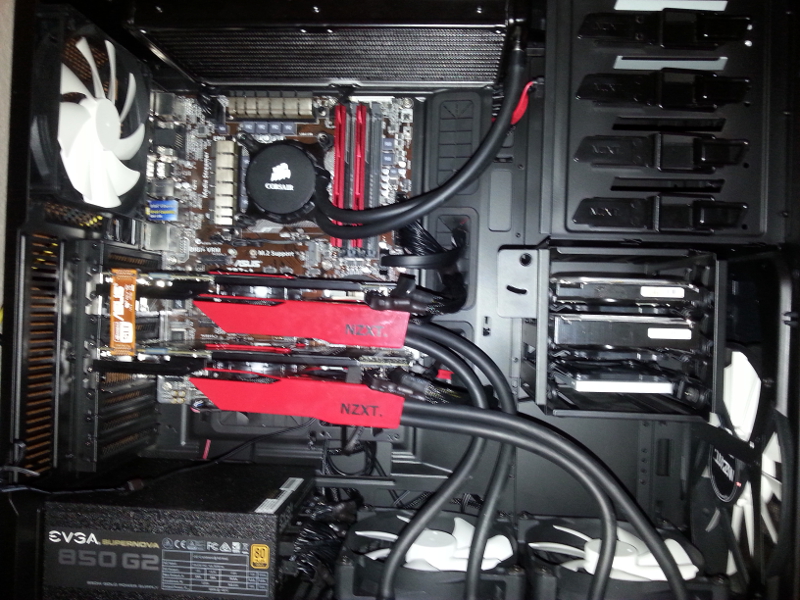
What I ended up with was a monster. Water cooled i7 4970k CPU that is overclocked to 4.7GHZ, 16GB of PC2400 DDR3 RAM, dual GTX 980 video cards which are both water cooled, 500GB SSD and two 2TB hard drives, all in a massive full tower case. My PC now has more radiators than my car.
Threw in a new 27" 1440p monitor, just for good measure. Coupled with my old 550 watt Logitech 5.1 surround sound speakers.
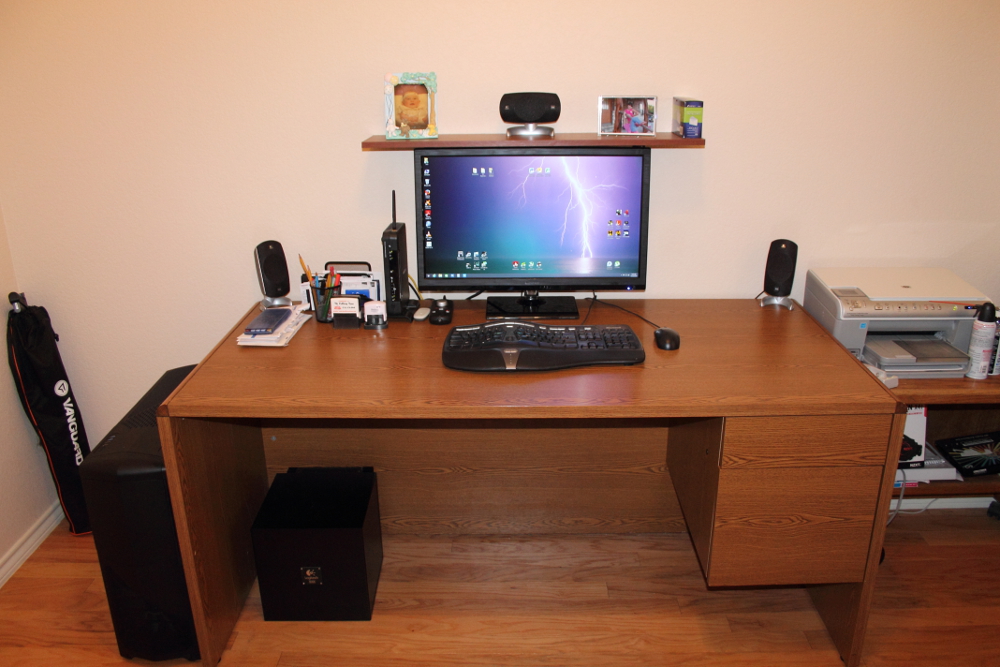
The thing is an absolute beast.
And I don't think my wife will ever forgive me for the money I spent on it.
Old PC bit the dust. Power supply failed and fried the motherboard along with it. Normally I would salvage what I could and replace only what I had to, but this time I decided to go all-in on a new build.
What I ended up with was a monster. Water cooled i7 4970k CPU that is overclocked to 4.7GHZ, 16GB of PC2400 DDR3 RAM, dual GTX 980 video cards which are both water cooled, 500GB SSD and two 2TB hard drives, all in a massive full tower case. My PC now has more radiators than my car.
Threw in a new 27" 1440p monitor, just for good measure. Coupled with my old 550 watt Logitech 5.1 surround sound speakers.
The thing is an absolute beast.
And I don't think my wife will ever forgive me for the money I spent on it.
Post *****
Joined: December 14, 2007
Posts: 19,953
Likes: 4
From: State of Jefferson Mountains USA
For the last several months my HP would ignore my power settings and wouldn't go to sleep from inactivity. Even tried changing settings to see if that would help. Reboot didn't work either.
Naturally I've been cursing Bill Gates that his updates screwed it up. As has happened before.
Yesterday I got a Java update and suddenly the power down settings work. So apparently it was Java this whole time.
Naturally I've been cursing Bill Gates that his updates screwed it up. As has happened before.
Yesterday I got a Java update and suddenly the power down settings work. So apparently it was Java this whole time.
So... I get a Windows update the other day (2)... and now my computer ignores my power settings again and won't sleep after an hour of inactivity.

Just Plain Rude!
Joined: February 1, 2004
Posts: 3,393
Likes: 18
From: Denton, TX


Super Boss Lawman Member
Joined: February 5, 2015
Posts: 4,247
Likes: 1,155
From: Yukon, OK
Agreed! I used Windows computers at home from 1995-2009. I went to a Mac in 2009 just to see if I would like it and I don't plan on switching back. However, I do have MS Office installed on the Mac and it works great.