


Sync 4.4 Update.

Thread Starter
GT Member

Joined: March 20, 2014
Posts: 119
Likes: 1
From: Stockton, CA
If it is staying on the "Installation Complete" screen it is done. The first one will be immediately followed by "Rebooting". It took my car about 8 minutes, for the basic Sync version, from the first "Installation Complete" to the second one on my 2014.

Super Boss Lawman Member
Joined: February 5, 2015
Posts: 4,247
Likes: 1,155
From: Yukon, OK
.....
It should take about 10 minutes before another INSTALLATION COMPLETE message comes up and the system may reboot. Refrain from touching any buttons until the process is completed. When SYNC displays INSTALLATION COMPLETE (after rebooting), press the MENU button to exit installation mode. Remove the USB and report your update at: Owner.Ford.com
It should take about 10 minutes before another INSTALLATION COMPLETE message comes up and the system may reboot. Refrain from touching any buttons until the process is completed. When SYNC displays INSTALLATION COMPLETE (after rebooting), press the MENU button to exit installation mode. Remove the USB and report your update at: Owner.Ford.com
Cobra Member
Joined: October 11, 2009
Posts: 1,126
Likes: 4
Super Boss Lawman Member
Joined: February 5, 2015
Posts: 4,247
Likes: 1,155
From: Yukon, OK
Super Boss Lawman Member
Joined: February 5, 2015
Posts: 4,247
Likes: 1,155
From: Yukon, OK
To be honest, I think I missed the first one it happened so fast. When I saw it should take 10 minutes and knew more than 10 had passed, I hit menu. The screen could be more informative while loading, that's for sure. And having a bogus install complete message is just lazy programming.

Mach 1 Member
Joined: May 13, 2005
Posts: 574
Likes: 1
From: Laval, Quebec
Got tired of waiting, so I hit the Menu button and screen came back, restarted the car and everything seems functional but not sure if the update got completed.
At least the radio and phone works fine....
Any idea how to see if the update has been performed ?
At least the radio and phone works fine....
Any idea how to see if the update has been performed ?

Mach 1 Member
Joined: May 13, 2005
Posts: 574
Likes: 1
From: Laval, Quebec
BTW I looked under system info tab and saw that the version is DR3T-14D544-AF.
So, does it means that the update is performed ?
See picture (btw it's in french)
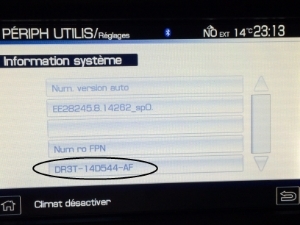
So, does it means that the update is performed ?
See picture (btw it's in french)

Last edited by Dineau; Jun 16, 2015 at 08:34 PM.
Cobra Member
Joined: October 11, 2009
Posts: 1,126
Likes: 4

one way to know update was done was now texting works, before it said "error downloading", and also when you play songs from BT it shows artist song name..
Mach 1 Member
Joined: May 13, 2005
Posts: 574
Likes: 1
From: Laval, Quebec
My text still does not work because I have an iPhone and I don't think this update is supposed to fix it.
But I do see the artist name and song when playing from bluetooth , but don't recall if it was working before.
But I do see the artist name and song when playing from bluetooth , but don't recall if it was working before.
Cobra Member
Joined: October 11, 2009
Posts: 1,126
Likes: 4
Maybe because you didnt leave it plugged long enough lol
After 3.5 hours and burning a needle of gas mine got few features added to it..
Last edited by HizliBullet; Mar 22, 2015 at 10:23 PM.
Cobra Member
Joined: October 11, 2009
Posts: 1,126
Likes: 4
I went to owner ford.com and uploaded a file inside of the USB, and it said that my install was successful, can you see this file too?? its inside SyncMyRide folder begins with Sync_CP127364_(YOUR VIN HERE).XML do you see this? then this page came up on my screen..
Mach 1 Member
Joined: May 13, 2005
Posts: 574
Likes: 1
From: Laval, Quebec
Yes, I have done it and gives the same thing, but i'm still not sure that this means that the actual update has been performed.
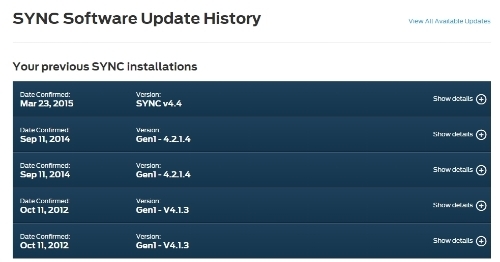
That's why I would like to see what others have inside the unit itself to compare...
Should have noted the number before the install but now it'sy too late

That's why I would like to see what others have inside the unit itself to compare...
Should have noted the number before the install but now it'sy too late
Last edited by Dineau; Mar 22, 2015 at 10:32 PM.

legacy Tms Member MEMORIAL Rest In Peace 10/06/2021
Joined: September 16, 2009
Posts: 3,381
Likes: 125
From: Clinton Tennessee


