Sync 4.4 Update.

Cobra Member

Joined: October 11, 2009
Posts: 1,126
Likes: 4
hey claude have you tried this? i saw it on owner.ford.com and thought it might help with itunes music bluetooth streaming

Cobra Member

Joined: January 4, 2013
Posts: 1,419
Likes: 119
From: Frisco, TX
Too true. I had a routine where I turned the key to the first stop as I reached back for my seat belt. By the time I had the belt buckled the system recognized the presence of the USB thumb and all was well - except when I forgot and turned the key all the way. Not a big deal, just annoying. Then to hear that it was fixed with this release and find it wasn't really was quite disappointing.

Ford In-Vehicle Technology Rep
Joined: August 11, 2011
Posts: 449
Likes: 3
With V4.4 installed, you should be able to receive incoming text messages while your iPhone is connected to SYNC. The iPhone is not capable of sending replies through SYNC currently. Keep an eye out for future updates for the iPhone along with SYNC.

Kim

Mach 1 Member
Joined: May 13, 2005
Posts: 574
Likes: 1
From: Laval, Quebec
I think they say to have the engine running is only to make sure the be battery won't die on you if the update takes too long. In my case I use the battery charger while I was doing the update.

Cobra Member
Joined: October 11, 2009
Posts: 1,126
Likes: 4
I have SYNC with voice-activated navigation, and its only my Xperia Z3 thats connected..after turning off few features now my phone doesnt support texting anymore


GT Member
Joined: January 30, 2015
Posts: 149
Likes: 1
From: Greenville, SC
Too true. I had a routine where I turned the key to the first stop as I reached back for my seat belt. By the time I had the belt buckled the system recognized the presence of the USB thumb and all was well - except when I forgot and turned the key all the way. Not a big deal, just annoying. Then to hear that it was fixed with this release and find it wasn't really was quite disappointing.
Yeah it still doesn't "remember" where I left it. Though mine always reverted to FM no matter what.

Bullitt Member
Joined: January 6, 2014
Posts: 345
Likes: 1
From: NYC
Anyone know what the deal is with getting this on a 2011? I go to the site and it says I am up to date with version 3.1. I called the Ford hotline and I was told the update is for 2010-2014 model years, but they have no explanation why it is not available to download.
Cobra Member
Joined: October 11, 2009
Posts: 1,126
Likes: 4
here find your vin (its 17 digits on the driver side door jam, or under windshield on driver side) and sign up for free syncmyride account from owner.ford.com, it will appear there.
Mach 1 Member
Joined: May 13, 2005
Posts: 574
Likes: 1
From: Laval, Quebec
One thing to check.. When I checked for my update last weekend, I went to the home page where you see a summary of your profile and in the notification section it said "No update available"
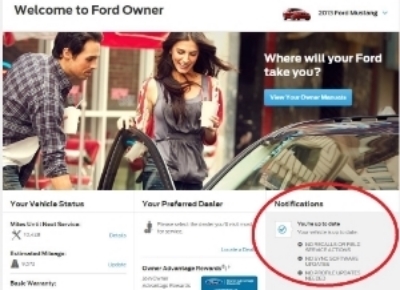
Then I went into my car profile, then in "Sync & How-tos" menu and under that menu at the right you have USEFUL LINKS -- Check for software updates
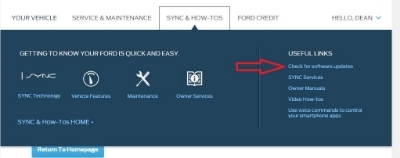
In in this section I saw the available update, that's also where you will see you update history.
Of course that it is after my update.. but check yours to see..
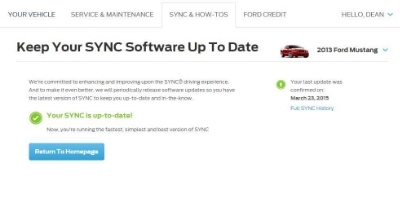

Then I went into my car profile, then in "Sync & How-tos" menu and under that menu at the right you have USEFUL LINKS -- Check for software updates

In in this section I saw the available update, that's also where you will see you update history.
Of course that it is after my update.. but check yours to see..

Last edited by Dineau; Mar 26, 2015 at 12:06 PM.

Legacy TMS Member
Joined: September 6, 2011
Posts: 1,892
Likes: 56
From: Kansas City, MO


GT Member
Joined: June 16, 2014
Posts: 163
Likes: 0
From: Alexandria, VA
Been a while since I posted here, but came back to report on the Sync update. So I log into Ford's site, grab the latest firmware, have Ford send me the instructions via email so I have them on my smartphone.
Holy hell, the instructions were nothing like the path actually needed to get to the install application option in my non-nav '14. I mean, I authenticated on Ford's website, and it pulled up my VIN and everything, but couldn't get me vehicle/version-specific instructions?
So the install took me about 10 minutes. I even got a voice prompt after the Installation Complete message saying the update is finished. So living by the adage of "trust but verify", nowhere in the menu can I actually confirm that the version installed corresponds to the Sync firmware. But it did write the XML file to the USB drive, and I uploaded it back to Ford's website.
I rarely text, so my main motivation to doing the update was to not have to temporarily go into accessory. But it still defaults to FM radio even though I only listen to music on the USB drive.
I'm the IT director at my company; if one of my direct reports put out this half-assed process company-wide, I'd either re-train or consider termination.
tl;dr: instructions are horrible, didn't even do what it said it would.
Holy hell, the instructions were nothing like the path actually needed to get to the install application option in my non-nav '14. I mean, I authenticated on Ford's website, and it pulled up my VIN and everything, but couldn't get me vehicle/version-specific instructions?
So the install took me about 10 minutes. I even got a voice prompt after the Installation Complete message saying the update is finished. So living by the adage of "trust but verify", nowhere in the menu can I actually confirm that the version installed corresponds to the Sync firmware. But it did write the XML file to the USB drive, and I uploaded it back to Ford's website.
I rarely text, so my main motivation to doing the update was to not have to temporarily go into accessory. But it still defaults to FM radio even though I only listen to music on the USB drive.
I'm the IT director at my company; if one of my direct reports put out this half-assed process company-wide, I'd either re-train or consider termination.
tl;dr: instructions are horrible, didn't even do what it said it would.
Last edited by K.A.I.N; Mar 26, 2015 at 01:53 PM.
GT Member
Joined: January 30, 2015
Posts: 149
Likes: 1
From: Greenville, SC
Been a while since I posted here, but came back to report on the Sync update. So I log into Ford's site, grab the latest firmware, have Ford send me the instructions via email so I have them on my smartphone.
Holy hell, the instructions were nothing like the path actually needed to get to the install application option in my non-nav '14. I mean, I authenticated on Ford's website, and it pulled up my VIN and everything, but couldn't get me vehicle/version-specific instructions?
So the install took me about 10 minutes. I even got a voice prompt after the Installation Complete message saying the update is finished. So living by the adage of "trust but verify", nowhere in the menu can I actually confirm that the version installed corresponds to the Sync firmware. But it did write the XML file to the USB drive, and I uploaded it back to Ford's website.
I rarely text, so my main motivation to doing the update was to not have to temporarily go into accessory. But it still defaults to FM radio even though I only listen to music on the USB drive.
I'm the IT director at my company; if one of my direct reports put out this half-assed process company-wide, I'd either re-train or consider termination.
tl;dr: instructions are horrible, didn't even do what it said it would.
Holy hell, the instructions were nothing like the path actually needed to get to the install application option in my non-nav '14. I mean, I authenticated on Ford's website, and it pulled up my VIN and everything, but couldn't get me vehicle/version-specific instructions?
So the install took me about 10 minutes. I even got a voice prompt after the Installation Complete message saying the update is finished. So living by the adage of "trust but verify", nowhere in the menu can I actually confirm that the version installed corresponds to the Sync firmware. But it did write the XML file to the USB drive, and I uploaded it back to Ford's website.
I rarely text, so my main motivation to doing the update was to not have to temporarily go into accessory. But it still defaults to FM radio even though I only listen to music on the USB drive.
I'm the IT director at my company; if one of my direct reports put out this half-assed process company-wide, I'd either re-train or consider termination.
tl;dr: instructions are horrible, didn't even do what it said it would.
And I think this update was 4 months over due as well.