


Sync 4.4 Update.


GT Member

Joined: March 21, 2014
Posts: 126
Likes: 8
From: Burnsville, MN
I lost USB1. I shut down, opened the door and tried again, now the USB worked and my library appeared. The songs played but no audio! Shut down, opened the door and tried again, now it works fine. Not sure what that was all about but maybe cycling the radio a couple times will bring back USB2.


Cobra Member

Joined: January 4, 2013
Posts: 1,419
Likes: 119
From: Frisco, TX
USB2 had gotten flaky in my car before the update so I moved my thumb drive back to USB. This morning I checked the cable where it plugs into USB2 and then moved the thumb back to the USB2 cable. It works fine but mine still does not remember the source as USB2. If I turn the key all the way to Start the radio come on to whichever band I had set last (AM or FM). I still have to hit Aux to get back to the thumb. I don't see that this update provided anything for me.

Mach 1 Member
Joined: May 13, 2005
Posts: 574
Likes: 1
From: Laval, Quebec
Look in here, you will find the "How-to" for the second USB port...
http://www.instructables.com/id/Micr...USB-Port-USB2/
http://www.instructables.com/id/Micr...USB-Port-USB2/

GT Member
Joined: April 2, 2012
Posts: 179
Likes: 2
From: Oregon
FYI - this is what the sync website is currently saying about this update. I noticed more verbiage around applink (from what was originally posted).
What's included in this update?
DL3T-14D544-AE SYNC v4.4
Bluetooth© Connectivity Improvements:
• Enhanced Bluetooth phone connection stability
• Enabled track information to be displayed for Bluetooth-streamed media including metadata such as song title, artist name and album title
• More robust Message Access Profile (MAP) functionality to handle SMS reception and Text2Speach output
Media Connectivity Improvements:
• Improved media connectivity for USB-equipped Apple devices, as well as streamlined device initialization and authentication process
• Previous USB or Bluetooth media source playback now resumed after ignition cycle
AppLink Functionality Improvements:
• Better AppLink customer experience with more robust features and reliable functionality
2010-2013 Basic SYNC and SYNC with MyFord (without Voice-Activated Navigation)
The v4.4 software update will add AppLink, in addition to improved quality updates, for 2010-2013 model year customers without Voice-Activated Navigation (who do not already have AppLink).
2010-2014 SYNC with Voice-Activated Navigation
This software will provide improved quality updates only for 2010-2014 model year customers who have Voice-Activated Navigation.
What's included in this update?
DL3T-14D544-AE SYNC v4.4
Bluetooth© Connectivity Improvements:
• Enhanced Bluetooth phone connection stability
• Enabled track information to be displayed for Bluetooth-streamed media including metadata such as song title, artist name and album title
• More robust Message Access Profile (MAP) functionality to handle SMS reception and Text2Speach output
Media Connectivity Improvements:
• Improved media connectivity for USB-equipped Apple devices, as well as streamlined device initialization and authentication process
• Previous USB or Bluetooth media source playback now resumed after ignition cycle
AppLink Functionality Improvements:
• Better AppLink customer experience with more robust features and reliable functionality
2010-2013 Basic SYNC and SYNC with MyFord (without Voice-Activated Navigation)
The v4.4 software update will add AppLink, in addition to improved quality updates, for 2010-2013 model year customers without Voice-Activated Navigation (who do not already have AppLink).
2010-2014 SYNC with Voice-Activated Navigation
This software will provide improved quality updates only for 2010-2014 model year customers who have Voice-Activated Navigation.


Shelby GT350 Member
Joined: May 31, 2013
Posts: 2,144
Likes: 51
From: Indianapolis
I just wanted to chime in and report how my update was completely successful!! Even more importantly, Sync DOES remember I was using bluetooth and resumes play when I start the car up again. Also the artist and song display is a great addition!! Thank you FordIVTteam for continuing to support Sync and provide updates!!
One side note...some of my settings got reset after the update. Does anyone remember how to make it so Sync doesn't say out loud "911 assist is set to off"? I thought it was turning Prompts off, but that didn't fix it.
FYI: I have a Lumia 920 Windows Phone with WP8.1 and Cortana, and Sync works very well with it. Speech to text replies with bluetooth work as well.
One side note...some of my settings got reset after the update. Does anyone remember how to make it so Sync doesn't say out loud "911 assist is set to off"? I thought it was turning Prompts off, but that didn't fix it.
FYI: I have a Lumia 920 Windows Phone with WP8.1 and Cortana, and Sync works very well with it. Speech to text replies with bluetooth work as well.
Last edited by Coyote5-0; Mar 30, 2015 at 11:29 AM.

Legacy TMS Member
Joined: September 6, 2011
Posts: 1,892
Likes: 56
From: Kansas City, MO

Mach 1 Member
Joined: June 25, 2006
Posts: 722
Likes: 5
From: Vancouver BC
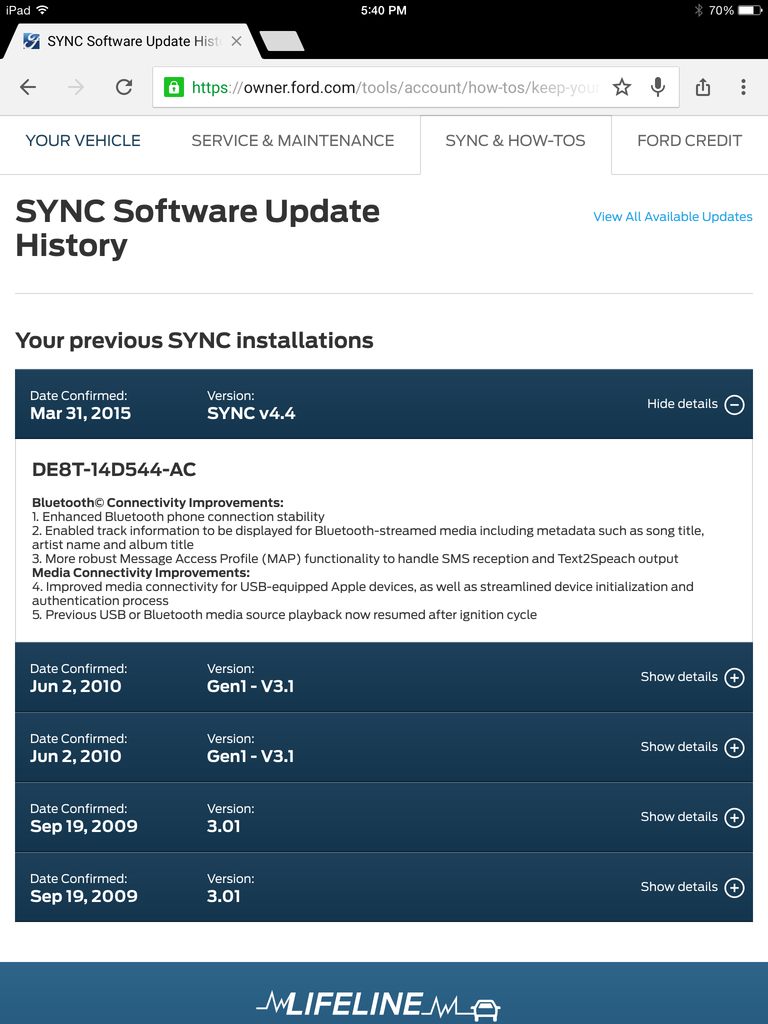
The update went great on my 2010 GT500!! I now have track and artist info on blu-tooth audio and can send and receive texts!! (Samsung S4)
Thank you Ford and Kim!!
Thank you Ford and Kim!!

Last edited by Cdvision; Mar 30, 2015 at 07:10 PM.

