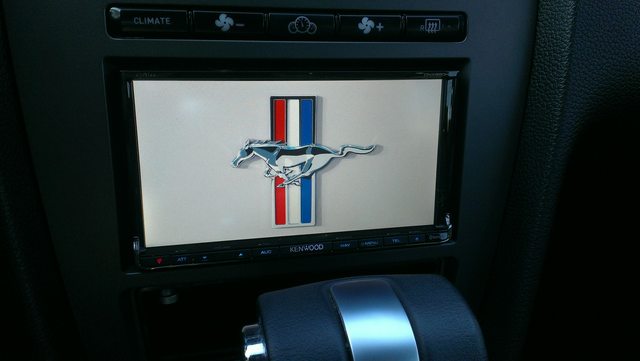
kenwood double din dash kit



GT Member

Joined: August 24, 2013
Posts: 102
Likes: 0
12V Guy,
I am really missing not having the time displayed on the Sync screen. I'm sure you looked at this but if we had the Sirius aftermarket module installed could you pick up a time signal off that to display through the Maestro unit on the Sync screen?
There's got to be some way to get Kenwood to pass the time function to you guys. For all the technology built into these units a very small request.
Maybe some one will root the H/U soon.
I am really missing not having the time displayed on the Sync screen. I'm sure you looked at this but if we had the Sirius aftermarket module installed could you pick up a time signal off that to display through the Maestro unit on the Sync screen?
There's got to be some way to get Kenwood to pass the time function to you guys. For all the technology built into these units a very small request.
Maybe some one will root the H/U soon.
FWIW, we do more with the secondary screen than any other interface. We keep it alive, put data from head unit there. Everyone else removes it or makes it go mostly dead.
Best,
12V Guy

Bullitt Member
Joined: May 18, 2013
Posts: 324
Likes: 1
From: Lake Mary, FL
If time permits, tomorrow I will pull the calipers out and take some measurements with regard to the gap. I have the following with which to measure:
1) iDataLink MUS1 Kit
2) Metra 99-5826CH Kit
3) OEM Radio
It's entirely possible that the gap was there and I never noticed it, but it just seems very 'pronounced' here - enough for it to catch my eye. Will keep you posted.
1) iDataLink MUS1 Kit
2) Metra 99-5826CH Kit
3) OEM Radio
It's entirely possible that the gap was there and I never noticed it, but it just seems very 'pronounced' here - enough for it to catch my eye. Will keep you posted.
GT Member
Joined: August 24, 2013
Posts: 102
Likes: 0
If time permits, tomorrow I will pull the calipers out and take some measurements with regard to the gap. I have the following with which to measure:
1) iDataLink MUS1 Kit
2) Metra 99-5826CH Kit
3) OEM Radio
It's entirely possible that the gap was there and I never noticed it, but it just seems very 'pronounced' here - enough for it to catch my eye. Will keep you posted.
1) iDataLink MUS1 Kit
2) Metra 99-5826CH Kit
3) OEM Radio
It's entirely possible that the gap was there and I never noticed it, but it just seems very 'pronounced' here - enough for it to catch my eye. Will keep you posted.
12V Guy

Bullitt Member
Joined: April 11, 2006
Posts: 277
Likes: 0
In the picture showing the antenna I pulled it out a bit to show but I keep it pushed forward a bit on the metal bracket I mentioned. The Sirius antenna is on the bracket on the other side FYI this is the view from the passenger side with the glove box removed
Last edited by kingofsting; Oct 29, 2013 at 06:28 PM.

Bullitt Member
Joined: August 28, 2013
Posts: 396
Likes: 7
From: Knoxville, TN
I put the GPS for my X920BT behind the dash and up near the rectangular vents. There's a long metal pipe and two metal brackets (one under each vent) pointing out toward the hood. In the picture showing the antenna I pulled it out a bit to show but I keep it pushed forward a bit on the metal bracket I mentioned. The Sirius antenna is on the bracket on the other side FYI this is the view from the passenger side with the glove box removed
Bullitt Member
Joined: August 28, 2013
Posts: 396
Likes: 7
From: Knoxville, TN
That's awesome...I'm planning to use the oem mustang antenna for the Sirius/xm, so reception shouldn't be an issue...I was worried about where to place the GPS antenna. Thanks
Last edited by EastTNMustang; Oct 29, 2013 at 06:50 PM.
Bullitt Member
Joined: April 11, 2006
Posts: 277
Likes: 0
And since my car is a lease I had to get a new fakra cover. Should be here in a few weeks from China!
Bullitt Member
Joined: May 18, 2013
Posts: 324
Likes: 1
From: Lake Mary, FL
I put mine on a flat section of plastic above the tachometer. Since there's no metal over that part of the dash, there are no reception issues. Gotta remember, those satellites are 28,000 miles up - another 2" aren't gonna bother that signal any...
Bullitt Member
Joined: August 28, 2013
Posts: 396
Likes: 7
From: Knoxville, TN
Actually, the GPS satellites are in a medium earth orbit closer to 12,600 miles above the earth...but I get what you mean. I'm glad the reception will be fine when placing the antenna up under the dash. Will keep the installation much cleaner and factory looking. Thanks
Bullitt Member
Joined: August 28, 2013
Posts: 396
Likes: 7
From: Knoxville, TN
I did a google search for kenwood startup screen images...it led me to the kenwood forums and on there were a few threads about how to change your startup screen. Not too difficult, you just have to use both hands to push the right buttons to get into the menu. Let me know if you don't find the website.
Last edited by EastTNMustang; Nov 1, 2013 at 05:30 AM.

Member
Joined: October 13, 2013
Posts: 5
Likes: 0
Bullitt Member
Joined: August 28, 2013
Posts: 396
Likes: 7
From: Knoxville, TN
I updated my DNX890HD boot screen using this video, the same button combo might work with the 770. Video Link: http://www.youtube.com/watch?v=fFU4MpvCoio