


kenwood double din dash kit


Member
Joined: June 22, 2011
Posts: 6
Likes: 0
From: Michigan
I just want to give a shout out to Mark (12v Guy) from ADS. I had a couple issue during my install, and he was a huge help. Really quick to respond and I have to say the product is top notch. Couldn't be happier with the results.
GT Member

Joined: August 24, 2013
Posts: 102
Likes: 0
We can't support Sync apps (Pandora and others) currently. What kind of phone do you have? You should be able to connect to Sync and stream Pandora, but you won't have song title, artist or thumbing controls. Typically, we recommend being connected with both BT systems for streaming and using the Kenwood BT for advanced apps like Pandora.
PM me if you want to chat some more.
Cheers,
GT Member
Joined: August 24, 2013
Posts: 102
Likes: 0
I was going to use the DNX6190HD, but was told I wouldn't be able to get the virtual gauges on the stereo, so I bought a 571HD. One question I do have is do I need to use the gps antenna and microphone that came with the stereo or will the Sync system use the factory gps antenna and factory microphone?
If you plan to use Sync for phone calls, you don't need to install the Microphone. You do not have a factory GPS antenna at the radio. You are likely looking at the satellite radio antenna which you cannot use for GPS. Install the Kenwood one, but they often work fine mounted under-dash so long as no metal above them.
Cheers,
Bullitt Member
Joined: September 9, 2009
Posts: 372
Likes: 0
From: Miami

Bullitt Member
Joined: September 9, 2009
Posts: 372
Likes: 0
From: Miami
Cobra Member
Joined: February 13, 2011
Posts: 1,399
Likes: 0
From: Southern NH
One other thing... The Kenwood head unit has a single USB female cord coming out the back, and the ADS-KIT-MUS1 has the 2 jacks in the storage area under the head unit. So are people rerouting the jack from the console to hook up to the kit jack, or buying a splitter cable to hook up from the head unit line to the 2 outlets in Maestro kit?
Bullitt Member
Joined: September 9, 2009
Posts: 372
Likes: 0
From: Miami
One other thing... The Kenwood head unit has a single USB female cord coming out the back, and the ADS-KIT-MUS1 has the 2 jacks in the storage area under the head unit. So are people rerouting the jack from the console to hook up to the kit jack, or buying a splitter cable to hook up from the head unit line to the 2 outlets in Maestro kit?

Member
Joined: April 19, 2014
Posts: 1
Likes: 0

So I finally pulled the trigger on this set up. Also ordered a GT500 steering wheel while I was at it...and some new crossed-drilled and slotted rotors and new pads. Its been a busy few days on eBay and Amazon. I ended up getting a pretty good deal on eBay for the dash setup. Won a bid for $799.99 for the setup below, plus had a 10% code and got $16 eBay bucks to bring it to just over $700 shipped. Not the full screen but I don't mind the ***** on the DNX690HD, especially when it saves money for other "go fast" mods. Everything should be here Monday/Tuesday so I will not be working from the office Wednesday if its at all nice outside (Michigan winter from Hell and all). Wish me luck on the install, but from what I've read on this thread, it sounds like a pretty simple one.
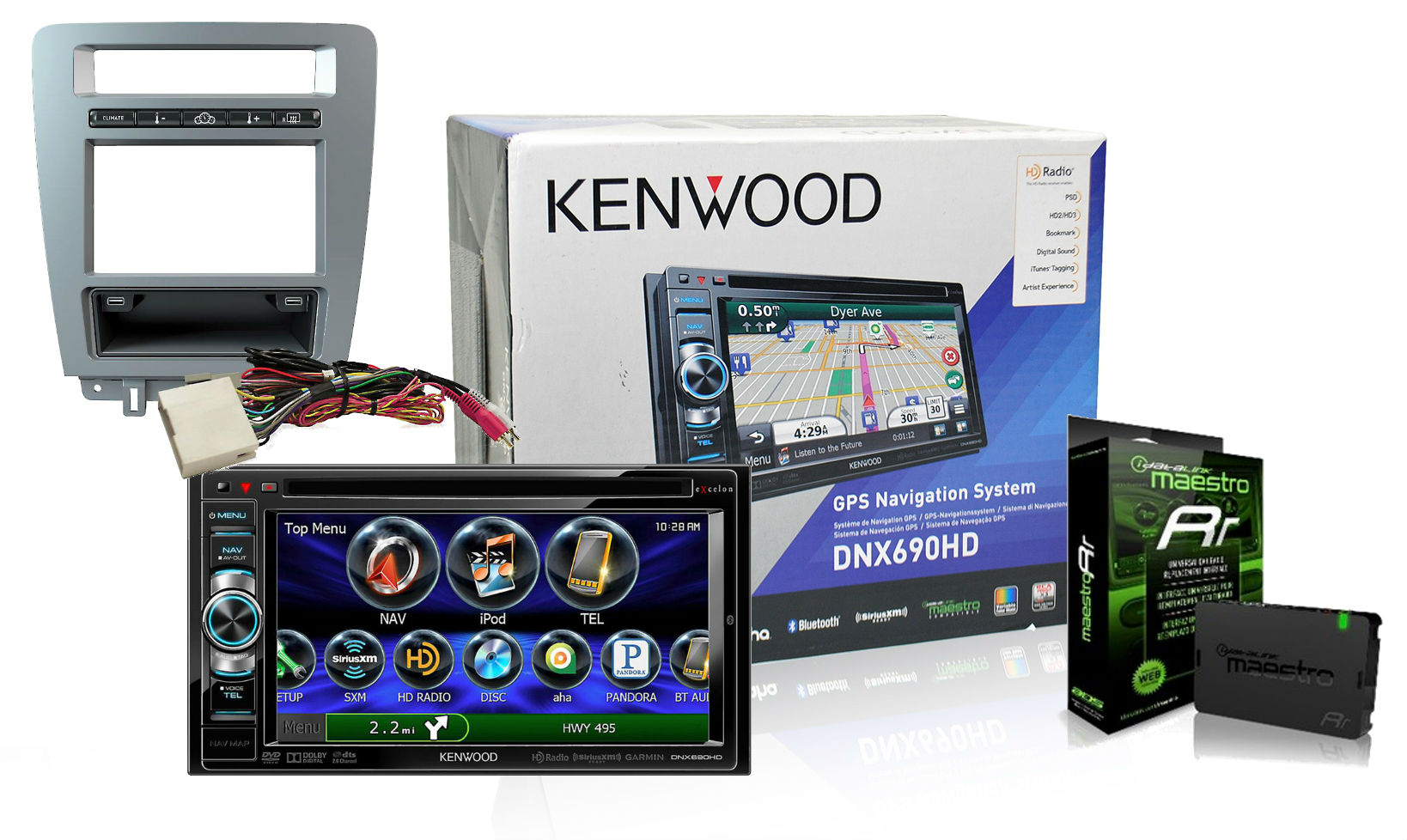
SOTS200 is the coupon code for any of these:
Kenwood DNX571HD with ADS Maestro Mustang ADSKITMUS1 and ADSMRR Steering Wheel Controls included - $1299.99 - $200 coupon Final Price = $1099.99
Kenwood Excelon DNX691HD with ADS Maestro Mustang ADSKITMUS1 and ADSMRR Steering Wheel Controls included-$1269.99 - $200 coupon Final Price = $1069.99
Kenwood DNX771HD with ADS Maestro Mustang ADSKITMUS1 and ADSMRR Steering Wheel Controls included $1499.99 - $200 coupon Final Price = $1299.99
SOTS300 is the coupon code for any of these:
Alpine INE-W957HD with ADS Maestro Mustang ADSKITMUS1 and ADSMRR Steering Wheel Controls included $1699.99 - $300 coupon = Final Price - $1399.99
Kenwood Excelon DNN991HD with ADS Maestro Mustang ADSKITMUS1 and ADSMRR Steering Wheel Controls included $1899.99 - $300 coupon - Final Price $1599.99
Kenwood Excelon DNX891HD with ADS Maestro Mustang ADSKITMUS1 and ADSMRR Steering Wheel Controls included $1599.99 - $300 coupon - Final Price $1299.99
GT Member
Joined: August 24, 2013
Posts: 102
Likes: 0
One other thing... The Kenwood head unit has a single USB female cord coming out the back, and the ADS-KIT-MUS1 has the 2 jacks in the storage area under the head unit. So are people rerouting the jack from the console to hook up to the kit jack, or buying a splitter cable to hook up from the head unit line to the 2 outlets in Maestro kit?
We put two in the kit because some radios have one and others have 2. I would leave Sync where it is, use one of the USB plugs for your DNX690 USB cable. You could leave the other unused or get a power adaptor and wire it up to there so you have a charging port. A splitter will not work unless it splits into 1 USB with all the pins and 1 with only charging. The DNX is not a HUB and IIRC it cannot recognize a hub plugged into it.
Cheers,
GT Member
Joined: August 24, 2013
Posts: 102
Likes: 0
Cobra Member
Joined: February 13, 2011
Posts: 1,399
Likes: 0
From: Southern NH
We put two in the kit because some radios have one and others have 2. I would leave Sync where it is, use one of the USB plugs for your DNX690 USB cable. You could leave the other unused or get a power adaptor and wire it up to there so you have a charging port. A splitter will not work unless it splits into 1 USB with all the pins and 1 with only charging. The DNX is not a HUB and IIRC it cannot recognize a hub plugged into it.
Cheers,
Cheers,
GT Member
Joined: August 24, 2013
Posts: 102
Likes: 0
I already got a cheap hub, so you will get confirmation one way or the other if the hub works or not. Assuming it doesn't, I will route a cable from the 2nd USB port from the Sync module to the extra jack in the Maestro. I tried to check the gender of the 2nd jack, by unplugging the existing cable, and trying the smaller D shaped standard jack in, but it didn't want to fit, though I only poked it a few times from that awkward position under the dash. A dentist angled mirror tool would work wonders here, I will have to pick one up.
To access it with your voice you will need to say USB2 to Sync.
Cheers,


 [/img]
Mach 1 Member
Joined: April 3, 2012
Posts: 971
Likes: 144
From: Indy
 I like it. Good to see that it keeps the time and the temps. I would like to hear your impressions of it once you have had a chance to use it.
 Better check your tire pressures left rear is a little low


Banned
Joined: July 4, 2012
Posts: 2,982
Likes: 0
From: Washington, DC
yeah, i need to scrounge up some quarters.