


kenwood double din dash kit

Shelby GT500 Member

Joined: September 8, 2009
Posts: 2,586
Likes: 4
From: Lithia, FL
Left front sucked the air out of the left rear
 I like it. Good to see that it keeps the time and the temps. I would like to hear your impressions of it once you have had a chance to use it.

Mach 1 Member
Joined: October 20, 2004
Posts: 730
Likes: 0
From: Victoria Canada
I'm Gonna Give It A Go.....
Well I think I will do this as well...Looks like a great mod and you're not really changing the car. You can always go back to stock. So I picked up the DNX691HD today for a decent price. Now all I need are the rest of the pieces...
https://www.flickr.com/photos/canond...s/14152943419/
Wish me luck ! I can do stereos in my old cars, not too sure how I am gonna be doing it to this one !
https://www.flickr.com/photos/canond...s/14152943419/
Wish me luck ! I can do stereos in my old cars, not too sure how I am gonna be doing it to this one !
Cobra Member
Joined: February 13, 2011
Posts: 1,399
Likes: 0
From: Southern NH
The ODBII trick is that one wire is a straight splice, and the other is a re-route snip. I wasn't paying attn to the wiring diagram and spliced both of them, and oh look, it doesn't work. Follow the instructions, bingo, it works.
FYI that thin blue wire is the one you want as shown in the prev post in this thread. Pay attention to its neighbors and you'll find it easily enough, its NOT wrapped up other bundles. Getting the harness out of the Sync module was barrel of fun...
FYI that thin blue wire is the one you want as shown in the prev post in this thread. Pay attention to its neighbors and you'll find it easily enough, its NOT wrapped up other bundles. Getting the harness out of the Sync module was barrel of fun...
Mach 1 Member
Joined: October 20, 2004
Posts: 730
Likes: 0
From: Victoria Canada
So I have been doing a lot of reading on this installation. My Maestro and dash kit are still in transit...sigh...but that's OK it gives me time to do some reading.
Let me know if I have this right....When I connect to the Sync,(SWI 2 INPUT) wire (the thin blue one), that is a straight cut and connect, from the steering wheel side to the to the T-Harness.
On the OBD2, I should splice/solder into the wires at pin 6 & pin 14.
I am thinking of doing all the splicing this weekend and putting end connectors on so I can just put plugs on the T-Harness wires and plug them in when I do the install.
Also, as I have a base system in from the factory, so I will be putting better speakers in the doors. I am looking at the Kenwood KFC-C6895PS .
Let me know if I have this right....When I connect to the Sync,(SWI 2 INPUT) wire (the thin blue one), that is a straight cut and connect, from the steering wheel side to the to the T-Harness.
On the OBD2, I should splice/solder into the wires at pin 6 & pin 14.
I am thinking of doing all the splicing this weekend and putting end connectors on so I can just put plugs on the T-Harness wires and plug them in when I do the install.
Also, as I have a base system in from the factory, so I will be putting better speakers in the doors. I am looking at the Kenwood KFC-C6895PS .
Last edited by flight96; Jun 11, 2014 at 07:06 PM.
Mach 1 Member
Joined: October 20, 2004
Posts: 730
Likes: 0
From: Victoria Canada
Well after doing some more research I decided on JL TR570-CXi speakers instead.... Still waiting for my Maestro and Dash kit.....**** ebay shipping to Canada just sucks ! Went from Las Vegas to Kentucky, now they're on the way from Kentucky all the way back here to Victoria !! WTF !!


Bullitt Member
Joined: August 19, 2013
Posts: 287
Likes: 11
Two days and I've read every post. Here are my questions/comments.
Seems like a clock would be an easy and cheap thing to add.
Yeah, I think I'd be closer to doing this if I didn't have to pay for NAV. I don't really think I'd use it much in the Mustang.
So the USB in the center and USB 2 behind the glove box still work with sync?
This needs pics/video. I would like to know how to tap into the factory SAT antenna when so many other have said you can't.
Why did you sell?
How is your factory display showing the clock? I thought that wasn't possible.
If I do this I think the soldering and running a backup camera (If I do it I might as well go all in...if I have to buy NAV) will be the tough parts.
Sorry man, I hear you. There is nothing we can do. Our module has not real time clock. Kenwood will not support any new stuff mid year and often new stuff only goes into the new models and not back into older ones. The sat tuner is connected to Kenwood, as is the GPS receiver. So it's not something we can do. We are looking for other options so without giving you false hope, we will keep trying.
FWIW, we do more with the secondary screen than any other interface. We keep it alive, put data from head unit there. Everyone else removes it or makes it go mostly dead.
Best,
12V Guy
FWIW, we do more with the secondary screen than any other interface. We keep it alive, put data from head unit there. Everyone else removes it or makes it go mostly dead.
Best,
12V Guy
You might want to update the first post of this thread - http://www.f150forum.com/f30/maestro...ention-192560/ - to say that the DDX-370 is not fully compatible. That's where I got the info that it had to be a 2013 unit. Granted you did say DNN or DNX and I didn't read through all seven pages to see if it came up later.
On a personal note - it's a bit disappointing to me that even newer 2013 Kenwood basic models are not including the IDS port and functionality. Not everyone wants (or wants to pay for) a full navigation radio.
On a personal note - it's a bit disappointing to me that even newer 2013 Kenwood basic models are not including the IDS port and functionality. Not everyone wants (or wants to pay for) a full navigation radio.
The RR kit will have your steering wheel adapter.
I must say the more time I spend with this setup, the more I like it. I have now added the SiriusXM Sat adapter. Easy to put in, and after I removed the plastic tip, I was able to plug my OEM antenna directly into the XM tuner. I called up XM, and had them WAIVED my 15 dollar fee, and BAM ! Sat radio in the Shelby now. Now all I need is a nice back-up cam.
I must say the more time I spend with this setup, the more I like it. I have now added the SiriusXM Sat adapter. Easy to put in, and after I removed the plastic tip, I was able to plug my OEM antenna directly into the XM tuner. I called up XM, and had them WAIVED my 15 dollar fee, and BAM ! Sat radio in the Shelby now. Now all I need is a nice back-up cam.


 [/img]
If I do this I think the soldering and running a backup camera (If I do it I might as well go all in...if I have to buy NAV) will be the tough parts.
Mach 1 Member
Joined: October 20, 2004
Posts: 730
Likes: 0
From: Victoria Canada
I know the DNX691HD I have has time on it. Plus you retain your top screen (Secondary screen) which has a clock, so its not an issue.
As for all your other questions,I am about to find out on my own. Apparently there are parcels at my house as of today !! So I will be starting the istallation today !!
As for all your other questions,I am about to find out on my own. Apparently there are parcels at my house as of today !! So I will be starting the istallation today !!
Mach 1 Member
Joined: October 20, 2004
Posts: 730
Likes: 0
From: Victoria Canada

Well...So much for my enthusiasm....Just went through the items and It seems like im missing things...First off there are no installation instructions except for a small one in Spanish, which I do not speak. No USB cables..
http://i1296.photobucket.com/albums/...ps2e8a8407.jpg
So now I have all these wires and no guide or anything to tell me what to do with them? Who knows what the hell else is missing !?
http://i1296.photobucket.com/albums/...ps2e8a8407.jpg
So now I have all these
wires and no guide or anything to tell me what to do with them? Who knows what the hell else is missing !?
Last edited by flight96; Jun 18, 2014 at 03:42 PM.
Mach 1 Member
Joined: October 20, 2004
Posts: 730
Likes: 0
From: Victoria Canada
Im replying to myself now...anyway, I am an idiot...lol...The USB cable is on the radio(DUH) so that is not an issue. I downloaded the manual from ADS so I should be good to go. I finally had a chance to have a look at everything last night. Looks like there is a ton of soldering to do so I went out and bought a new iron and some heat shrink.
For anyone who has done this, it looks to me like there will be a lot of 'left over' wires. Im putting in the DNX691HD (No Sat Radio). The head unit has some wires on the back that are folded over and taped. Are these not used ?
For anyone who has done this, it looks to me like there will be a lot of 'left over' wires. Im putting in the DNX691HD (No Sat Radio). The head unit has some wires on the back that are folded over and taped. Are these not used ?
Mach 1 Member
Joined: October 20, 2004
Posts: 730
Likes: 0
From: Victoria Canada
So I have hit a small snag...lol...Im connecting the wire between the MUS1 and the Kenwood harness. There are wires that dont quit match up..
1- On the back of the Kenwood there are 5 wires that are curled over,sealed and labelled (ILLUMI,P.Cont,Ant Cont,Remote Cont & Mute) unlike the rest of the wires. Which of these, if any, are used ?
2- Being that I have a base OEM system to start with, there is no AMP/ SUbs (I may install at a later date), Do I just tape up the RCA connections for later use?
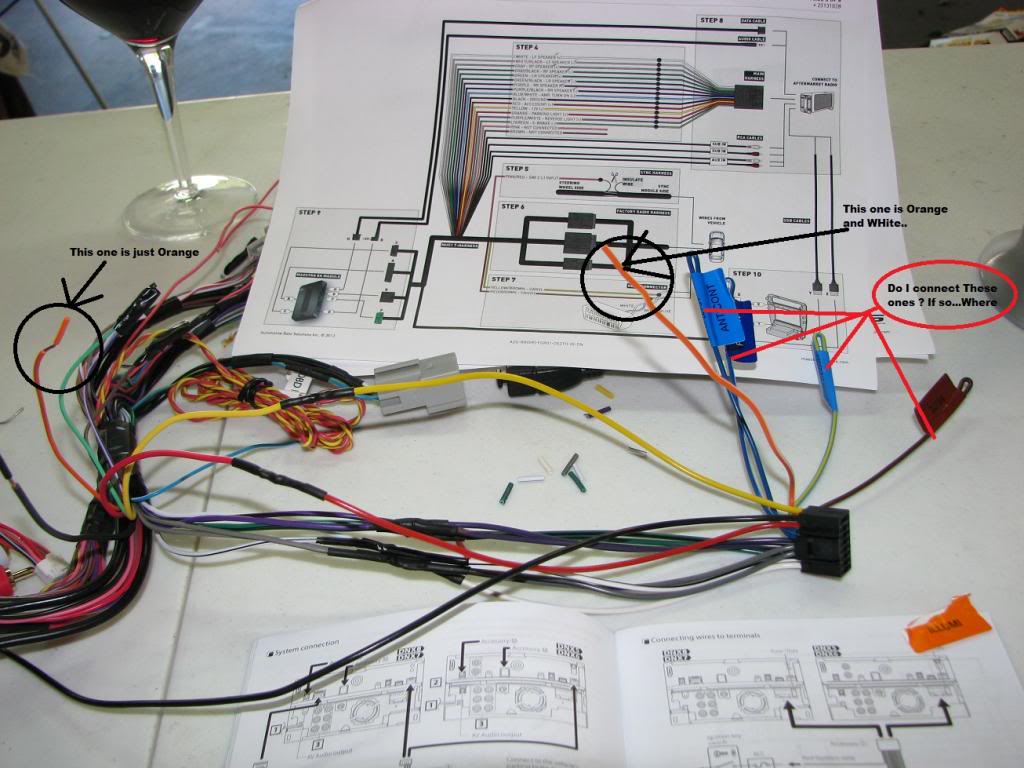
3- Not pictured is the park brake and backup light accessory wires. I will not be installing a back-up camera and I don't want the park brake safety on so can I just leave these off ?
1- On the back of the Kenwood there are 5 wires that are curled over,sealed and labelled (ILLUMI,P.Cont,Ant Cont,Remote Cont & Mute) unlike the rest of the wires. Which of these, if any, are used ?
2- Being that I have a base OEM system to start with, there is no AMP/ SUbs (I may install at a later date), Do I just tape up the RCA connections for later use?

3- Not pictured is the park brake and backup light accessory wires. I will not be installing a back-up camera and I don't want the park brake safety on so can I just leave these off ?
Mach 1 Member
Joined: June 9, 2010
Posts: 717
Likes: 0
From: Mid-West
12V guy-
I am considering this setup for my 2012 Boss (non-sync) vehicle.
I understand that I would need:
1) an applicable Kenwood unit.
2) ADS-KIT-MUS1 Dash Kit
3) ADS-HDN(SR)-FOR01 Factory Integration Adapter
4) Maestro ADS-MRR Factory integration Adapter
These are the numbers as they are on Crutchfield, they seem a bit different than the idatalink websites. I just wanted to make sure I was getting the proper pieces.
I am considering this setup for my 2012 Boss (non-sync) vehicle.
I understand that I would need:
1) an applicable Kenwood unit.
2) ADS-KIT-MUS1 Dash Kit
3) ADS-HDN(SR)-FOR01 Factory Integration Adapter
4) Maestro ADS-MRR Factory integration Adapter
These are the numbers as they are on Crutchfield, they seem a bit different than the idatalink websites. I just wanted to make sure I was getting the proper pieces.
Bullitt Member
Joined: September 9, 2009
Posts: 372
Likes: 0
From: Miami
For Mustang5.0 there is a clip that will come off when you just remove the clip. It will then plug into your Kenwood unit with no issue.
For the clock, I heard the 14 Kenwood units will allow the clock to show in the top screen. I was hoping Kenwood would write a patch letting the 13 models do this as well. It sucks not seeing a clock when you are on the Nav screens. Or how small the clock is on any other screen.
For the clock, I heard the 14 Kenwood units will allow the clock to show in the top screen. I was hoping Kenwood would write a patch letting the 13 models do this as well. It sucks not seeing a clock when you are on the Nav screens. Or how small the clock is on any other screen.
Mach 1 Member
Joined: October 20, 2004
Posts: 730
Likes: 0
From: Victoria Canada
12V guy-
I am considering this setup for my 2012 Boss (non-sync) vehicle.
I understand that I would need:
1) an applicable Kenwood unit.
2) ADS-KIT-MUS1 Dash Kit
3) ADS-HDN(SR)-FOR01 Factory Integration Adapter
4) Maestro ADS-MRR Factory integration Adapter
These are the numbers as they are on Crutchfield, they seem a bit different than the idatalink websites. I just wanted to make sure I was getting the proper pieces.
I am considering this setup for my 2012 Boss (non-sync) vehicle.
I understand that I would need:
1) an applicable Kenwood unit.
2) ADS-KIT-MUS1 Dash Kit
3) ADS-HDN(SR)-FOR01 Factory Integration Adapter
4) Maestro ADS-MRR Factory integration Adapter
These are the numbers as they are on Crutchfield, they seem a bit different than the idatalink websites. I just wanted to make sure I was getting the proper pieces.
You dont need # 3 ( 3) ADS-HDN(SR)-FOR01 Factory Integration Adapter) The harness is included in the MUS1 Dash Kit....
Mach 1 Member
Joined: October 20, 2004
Posts: 730
Likes: 0
From: Victoria Canada
Working !!
Well I got it all done on the weekend and it worked first try !! Go figure. So now Im working on a startup screen... This is what I've made so far..
http://i1296.photobucket.com/albums/...psc312e4d7.jpg
what do ya think....
http://i1296.photobucket.com/albums/...psc312e4d7.jpg
what do ya think....
Last edited by flight96; Jun 24, 2014 at 04:00 PM.
Bullitt Member
Joined: August 19, 2013
Posts: 287
Likes: 11
For Mustang5.0 there is a clip that will come off when you just remove the clip. It will then plug into your Kenwood unit with no issue.
For the clock, I heard the 14 Kenwood units will allow the clock to show in the top screen. I was hoping Kenwood would write a patch letting the 13 models do this as well. It sucks not seeing a clock when you are on the Nav screens. Or how small the clock is on any other screen.
For the clock, I heard the 14 Kenwood units will allow the clock to show in the top screen. I was hoping Kenwood would write a patch letting the 13 models do this as well. It sucks not seeing a clock when you are on the Nav screens. Or how small the clock is on any other screen.
Also glad to see they got the clock working. I figured it shouldn't be that difficult and it's very useful.

Member
Joined: April 6, 2014
Posts: 1
Likes: 0
From: Las Vegas, NV
So I have hit a small snag...lol...Im connecting the wire between the MUS1 and the Kenwood harness. There are wires that dont quit match up..
1- On the back of the Kenwood there are 5 wires that are curled over,sealed and labelled (ILLUMI,P.Cont,Ant Cont,Remote Cont & Mute) unlike the rest of the wires. Which of these, if any, are used ?
2- Being that I have a base OEM system to start with, there is no AMP/ SUbs (I may install at a later date), Do I just tape up the RCA connections for later use?
3- Not pictured is the park brake and backup light accessory wires. I will not be installing a back-up camera and I don't want the park brake safety on so can I just leave these off ?
1- On the back of the Kenwood there are 5 wires that are curled over,sealed and labelled (ILLUMI,P.Cont,Ant Cont,Remote Cont & Mute) unlike the rest of the wires. Which of these, if any, are used ?
2- Being that I have a base OEM system to start with, there is no AMP/ SUbs (I may install at a later date), Do I just tape up the RCA connections for later use?
3- Not pictured is the park brake and backup light accessory wires. I will not be installing a back-up camera and I don't want the park brake safety on so can I just leave these off ?

V6 Member
Joined: July 29, 2013
Posts: 65
Likes: 0
From: Houston
No Diagram available yet. Basically, what you will do is cut the connection between the speaker wires from the radio and the T-harness. There are 4 pairs each with solid wire and wire with black stripe - Green, Purple, White and Gray. Once you cut them you will should tape off the wires to the radio. You can then take a short male to male RCA cord and cut it in half.
For all cases, the shield of the RCA (outside ring of RCA) will go to the wire with the black stripe and the solid wire will go to the signal wire (center part of RCA).
Take one half of RCA and wire it to the front speaker wires of the Maestro T-Harness - Gray to the RED RCA and White to the WHITE RCA. Then plug these into the Kenwood Front RCA outputs.
Take remaining half of the RCA cable and wire it to the rear speaker wires of the Maestro T-Harness - Purple to the RED RCA and Green to the WHITE RCA. Finally plug these into the Rear RCA outputs of the Kenwood.
This will reduce the signal into the factory amplifier and give you much more usable volume curve.
Cheers,
For all cases, the shield of the RCA (outside ring of RCA) will go to the wire with the black stripe and the solid wire will go to the signal wire (center part of RCA).
Take one half of RCA and wire it to the front speaker wires of the Maestro T-Harness - Gray to the RED RCA and White to the WHITE RCA. Then plug these into the Kenwood Front RCA outputs.
Take remaining half of the RCA cable and wire it to the rear speaker wires of the Maestro T-Harness - Purple to the RED RCA and Green to the WHITE RCA. Finally plug these into the Rear RCA outputs of the Kenwood.
This will reduce the signal into the factory amplifier and give you much more usable volume curve.
Cheers,
Just wanted to confirm that, even with the newer DNN991HD - the above would still be required on a 2014 GT, Shaker 500 system.
Planning to install in a few weeks and if it is better to go with RCA into the back of the Kenwood to avoid any possible hiss/noise - then I will not go to the trouble of connecting the front/rear speaker wires on the harness, and will solder in RCA instead as you advised a while back (and I also have the hand drawn diagram you did which was very helpful!).
Thanks!