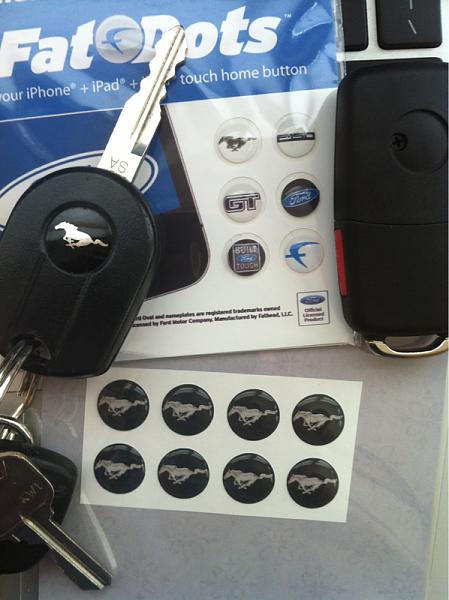
Got my new "Flip Key" set up tonight

Cobra R Member

Joined: September 22, 2012
Posts: 1,690
Likes: 17
From: Ontario, California
Bullitt Member
Joined: May 7, 2013
Posts: 486
Likes: 10
From: San Jose, CA
The logo was already on the key.
I bought it here http://http://www.ebay.com/itm/22107...84.m1439.l2649
I bought it here http://http://www.ebay.com/itm/22107...84.m1439.l2649
Cobra R Member
Joined: September 22, 2012
Posts: 1,690
Likes: 17
From: Ontario, California
The logo was already on the key.
I bought it here http://http://www.ebay.com/itm/22107...84.m1439.l2649
I bought it here http://http://www.ebay.com/itm/22107...84.m1439.l2649
Just Plain Rude!
Joined: February 1, 2004
Posts: 3,393
Likes: 18
From: Denton, TX
The link you posted has " http:// " twice at the beginning of it. Just delete one, and it's good to go.
That's the same one i bought, but I'm not a fan of the logos. I just haven't gotten a chance to replace them. Mine was actually already falling off when i got it, and it was covered with a piece of electrical tape. So i just left the tape on for now. Did you have to reglue yours?
That's the same one i bought, but I'm not a fan of the logos. I just haven't gotten a chance to replace them. Mine was actually already falling off when i got it, and it was covered with a piece of electrical tape. So i just left the tape on for now. Did you have to reglue yours?
Bullitt Member
Joined: May 7, 2013
Posts: 486
Likes: 10
From: San Jose, CA
The link you posted has " http:// " twice at the beginning of it. Just delete one, and it's good to go.
That's the same one i bought, but I'm not a fan of the logos. I just haven't gotten a chance to replace them. Mine was actually already falling off when i got it, and it was covered with a piece of electrical tape. So i just left the tape on for now. Did you have to reglue yours?
That's the same one i bought, but I'm not a fan of the logos. I just haven't gotten a chance to replace them. Mine was actually already falling off when i got it, and it was covered with a piece of electrical tape. So i just left the tape on for now. Did you have to reglue yours?
I think they had the black tape on it, so that you could still see the screw under it. Also, if you were to use the key, with say, a Lincoln, you probably want to change the logo.
Just Plain Rude!
Joined: February 1, 2004
Posts: 3,393
Likes: 18
From: Denton, TX
 I just started peeling off the tape and saw it falling off, and thought wtf. Lol.

Bullitt Member
Joined: May 18, 2013
Posts: 324
Likes: 1
From: Lake Mary, FL

Bullitt Member
Joined: January 16, 2013
Posts: 321
Likes: 0
From: Missouri
Found these on another forum and followed them successfully the first time. It took about a minute total for both parts. I edited slightly for clarity.
(PS, do NOT buy from eBay seller "cenn2010" - they are argumentative idiots who don't know what they are shipping and are not reliable in any way.)
PATs (Security) Key Programming
**You must have two original keys to perform this procedure. If you only have one key, you WILL have to take it to the dealer to get it programmed**
Remote Entry Key Programming
How to reprogram your remote entry transmitters
You must have all remote entry transmitters (maximum of six) available before beginning this procedure.
Note: Ensure the brake pedal is not depressed during this sequence.
To reprogram the remote entry transmitters:
(PS, do NOT buy from eBay seller "cenn2010" - they are argumentative idiots who don't know what they are shipping and are not reliable in any way.)
PATs (Security) Key Programming
**You must have two original keys to perform this procedure. If you only have one key, you WILL have to take it to the dealer to get it programmed**
- Insert an existing programmed key into the ignition.
- Turn the ignition to ON (RUN) and wait for the red security light to turn off. Do not leave the key in the ON position longer than 10 seconds, soon as the light turns off should be good enough. Turn key back to OFF.
- Remove the key and, between 3 and 10 seconds, insert a second programmed key and turn it to ON (RUN) and again wait for the security light to turn off. Do not leave the key in the ON position longer than 10 seconds, soon as the light turns off should be good enough. Remove the key.
- Insert the unprogrammed key before TWENTY seconds have elapsed and turn it to ON (RUN). Leave it the ON position for at least 3 seconds and turn back to OFF.
- The security light will light up for THREE seconds to indicate that the new key has been successfully programmed. Attempt to start your car. If it doesn't start try again.
- To program additional keys, repeat steps 1 through 5
Remote Entry Key Programming
How to reprogram your remote entry transmitters
You must have all remote entry transmitters (maximum of six) available before beginning this procedure.
Note: Ensure the brake pedal is not depressed during this sequence.
To reprogram the remote entry transmitters:
- Ensure the vehicle is electronically unlocked.
- Put the unprogrammed key in the ignition.
- Cycle eight times rapidly (within 10 seconds) between the 1 (OFF/LOCK) position and 3 (ON). Your movement must be very fast otherwise you're going to be too slow and it'll never work. It says you have 10 seconds but it feels like even less. Note: the eighth turn must end in the 3 (ON) position. The doors will lock, then unlock, to confirm that the programming mode has been activated.
- Within 20 seconds press the unlock button on each of your remote entry transmitters. You should have three keys total (2 pre-programmed keys, 1 flip key). Press one button from each key to ensure all three will still have working remote functionality. Note: If more than 20 seconds have passed, you will need to start the procedure over again. The doors will lock, then unlock, to confirm that this remote entry transmitter has been programmed.
- Repeat Step 4 to program each additional remote entry transmitter.
- Turn the ignition to the 1 (OFF/LOCK) position after you have finished programming all of the remote entry transmitters. Note: After 20 seconds, you will automatically exit the programming mode. The doors will lock, then unlock, to confirm that the programming mode has been exited.

Mach 1 Member
Joined: October 17, 2012
Posts: 526
Likes: 4
From: Culver City, CA
I've had my flip keys for about two months now. The only complaint I have is the Ford emblem is all scratched from normal wear and tear. Anyone have same problems? If so what are some solutions?

GT Member
Joined: May 30, 2013
Posts: 133
Likes: 0
From: Charleston, SC
Bullitt Member
Joined: May 18, 2013
Posts: 324
Likes: 1
From: Lake Mary, FL

Bullitt Member
Joined: January 3, 2012
Posts: 224
Likes: 2
From: Westfield NJ
I ordered my key tonight and some logos I found at http://www.fathead.com/automotive/fo...ts/?src=search
They are a tad smaller than 14mm but will see how they work out once I get them.
They are a tad smaller than 14mm but will see how they work out once I get them.

Bullitt Member
Joined: January 3, 2012
Posts: 224
Likes: 2
From: Westfield NJ
So I got my key and the fathead stickers. They are way to small but I managed to contact the seller on eBay who sells the 5.0 stickers and they made me a set of running pony stickers. They are not exactly what the factory oem key sticker looks like but they will do the trick.