Adding the OEM nav


GT Member

Joined: April 21, 2014
Posts: 103
Likes: 5
From: Kentucky
Also, is there a way to tell if the ACM is setup for a backup camera? They told me it was when I bought it, but when I go into reverse the screen does not go blank. I want to add one as my next project. Will I need to replace the ACM to do this?

Member
Joined: April 12, 2015
Posts: 17
Likes: 0
Hi, I just joined TMS because of this. Has anyone added the OEM Nav that already had a rear view camera? Did you have to repin the video wires to a different connector to make it go to the Nav screen instead of the mirror?
GT Member
Joined: April 21, 2014
Posts: 103
Likes: 5
From: Kentucky
Has anyone updated their sync since doing the swap? There seems to be a new version out and was just wondering which update I should use. The ACM and screen came out of a 2011 and my car is a 2012. Does anyone know if the updates go into the ACM or the actual sync module above the glove compartment?
Mach 1 Member
Joined: May 29, 2012
Posts: 791
Likes: 23
From: Westminster, CO
Has anyone updated their sync since doing the swap? There seems to be a new version out and was just wondering which update I should use. The ACM and screen came out of a 2011 and my car is a 2012. Does anyone know if the updates go into the ACM or the actual sync module above the glove compartment?
The update only goes into the sync module.
LEXiiON
GT Member
Joined: April 21, 2014
Posts: 103
Likes: 5
From: Kentucky
Ok,great. So I would assume I would get the update for my 2012 then? Is the 4.4 update the one you used? Also, does it add anything useful to make it worth the hassle of updating? I hear it can take quite sometime for the update. I am hoping it will enable the text messaging feature for my galaxy note 4, it does not work right now for some reason.
I am asking cause I was not sure if the updates for navigation were different than none nav. Don't want to put the wrong update in if that is even possible?
I am asking cause I was not sure if the updates for navigation were different than none nav. Don't want to put the wrong update in if that is even possible?
GT Member
Joined: April 21, 2014
Posts: 103
Likes: 5
From: Kentucky
Update went without an issue. I don't seem to have the bug about the last selected source.
I do seem to be having issues with the alpine ktp445U. Is a line output converter required for this swap? I tapped into the big connector on the passenger side and soldered some rca's to the wires per the diagram to connect as input to the amp but I am having some really weird issues with just my left front speaker making noises and the only way to stop it is to cut the actual speaker wire going to the speaker. Just disconnecting the rca for that input does not stop the noise.
Can anyone that has done the nav swap and did not go the oem amp route assist me on this? My local shop seems a bit clueless on this since I did the swap. I mainly want to make sure I am splicing into the correct wires for the inputs and the speakers. Any help would be greatly appreciated. Thanks in advance......
I do seem to be having issues with the alpine ktp445U. Is a line output converter required for this swap? I tapped into the big connector on the passenger side and soldered some rca's to the wires per the diagram to connect as input to the amp but I am having some really weird issues with just my left front speaker making noises and the only way to stop it is to cut the actual speaker wire going to the speaker. Just disconnecting the rca for that input does not stop the noise.
Can anyone that has done the nav swap and did not go the oem amp route assist me on this? My local shop seems a bit clueless on this since I did the swap. I mainly want to make sure I am splicing into the correct wires for the inputs and the speakers. Any help would be greatly appreciated. Thanks in advance......

Member
Joined: October 10, 2011
Posts: 12
Likes: 0
Hey Guys, if anyone would chime in to summarize for what parts are needed in my case other than the screen/bezel .
I do not want to add parking sensors, rear camera, dual hvac, all i want is the screen to work properly along with the NAV. My car is a 2011 premium with sync and shaker 500.
I do not want to add parking sensors, rear camera, dual hvac, all i want is the screen to work properly along with the NAV. My car is a 2011 premium with sync and shaker 500.

Thread Starter
Legacy TMS Member
Joined: November 7, 2006
Posts: 2,792
Likes: 58
From: Alberta
Hey Guys, if anyone would chime in to summarize for what parts are needed in my case other than the screen/bezel .
I do not want to add parking sensors, rear camera, dual hvac, all i want is the screen to work properly along with the NAV. My car is a 2011 premium with sync and shaker 500.
I do not want to add parking sensors, rear camera, dual hvac, all i want is the screen to work properly along with the NAV. My car is a 2011 premium with sync and shaker 500.

V6 Member
Joined: June 15, 2013
Posts: 57
Likes: 0
I am in the middle of finally doing this and almost have the dash out, but I couldn't do it without removing the Automatic shifter, so am in the process of doing that. However, I am having a heck of a time trying to remove the selector lever cable retaining clip. It seems like I should just be able to squeeze it and it pops off, but for some reason it's not moving. Am I missing something? Should I just cut it off since it is supposed to be replaced anyways?
V6 Member
Joined: June 15, 2013
Posts: 57
Likes: 0
Thanks, but I was finally able to get it off, there were two tabs that had to be pushed out before it could detach. No I am trying to figure out the main dash harness. Trying to unplug and plug as I go, but this thing wraps all over the place and parts of the new harness seem much stiffer than the old one. Not going as quickly as I had hoped. Oh well, I have a ride to work for the next few days so I should hopefully be able to finish it by then. Thanks all.
V6 Member
Joined: June 15, 2013
Posts: 57
Likes: 0
I've almost finished with the harnesses, but I am at the Antenna splitter harness and climate harness and am kind of stuck. Where exactly is the splitter supposed to hook into all of this? I believe the two plug side goes into the ACM, but I cannot find where the single-plug side goes into. Is this not a part of the main harness?
Also, for the climate harness, it read like it was a part of the main harness and had to be replaced, but I cannot find anything on the main harness that matches close to the climate harness. I am assuming this is in the car still and is not part of the main harness.
Reading through the thread again, it seems like what I am assuming is correct, but I just want to make sure in case someone knows off-hand.
Also, for the climate harness, it read like it was a part of the main harness and had to be replaced, but I cannot find anything on the main harness that matches close to the climate harness. I am assuming this is in the car still and is not part of the main harness.
Reading through the thread again, it seems like what I am assuming is correct, but I just want to make sure in case someone knows off-hand.

Member
Joined: May 4, 2015
Posts: 17
Likes: 0
From: Virginia
Well....I'm definitely coming in late for this party, But I got myself a Nav Unit(18806), Screen(10E899), bezel w/heated seats(18842), heater module(19980), main harness(14401) and Light Sensor(13A018)Is it safe to assume this is all I need to make it work? (Dealing with the dual climate control at a later date)
Last edited by Marine8d; May 4, 2015 at 08:11 PM. Reason: Typo
Thread Starter
Legacy TMS Member
Joined: November 7, 2006
Posts: 2,792
Likes: 58
From: Alberta
I've almost finished with the harnesses, but I am at the Antenna splitter harness and climate harness and am kind of stuck. Where exactly is the splitter supposed to hook into all of this? I believe the two plug side goes into the ACM, but I cannot find where the single-plug side goes into. Is this not a part of the main harness?
Also, for the climate harness, it read like it was a part of the main harness and had to be replaced, but I cannot find anything on the main harness that matches close to the climate harness. I am assuming this is in the car still and is not part of the main harness.
Reading through the thread again, it seems like what I am assuming is correct, but I just want to make sure in case someone knows off-hand.
Also, for the climate harness, it read like it was a part of the main harness and had to be replaced, but I cannot find anything on the main harness that matches close to the climate harness. I am assuming this is in the car still and is not part of the main harness.
Reading through the thread again, it seems like what I am assuming is correct, but I just want to make sure in case someone knows off-hand.
Not sure I remember right, but I think the antennae splitter does not plug in to the main harness.
Thread Starter
Legacy TMS Member
Joined: November 7, 2006
Posts: 2,792
Likes: 58
From: Alberta
Well....I'm definitely coming in late for this party, But I got myself a Nav Unit(18806), Screen(10E899), bezel w/heated seats(18842), heater module(19980), main harness(14401) and Light Sensor(13A018)Is it safe to assume this is all I need to make it work? (Dealing with the dual climate control at a later date)
Cheers

Member
Joined: March 19, 2015
Posts: 12
Likes: 0
From: Strongsville OH
I changed the body harness and it was part of that for the antenna I have a cable on eBay that I think you could use.
Member
Joined: May 4, 2015
Posts: 17
Likes: 0
From: Virginia
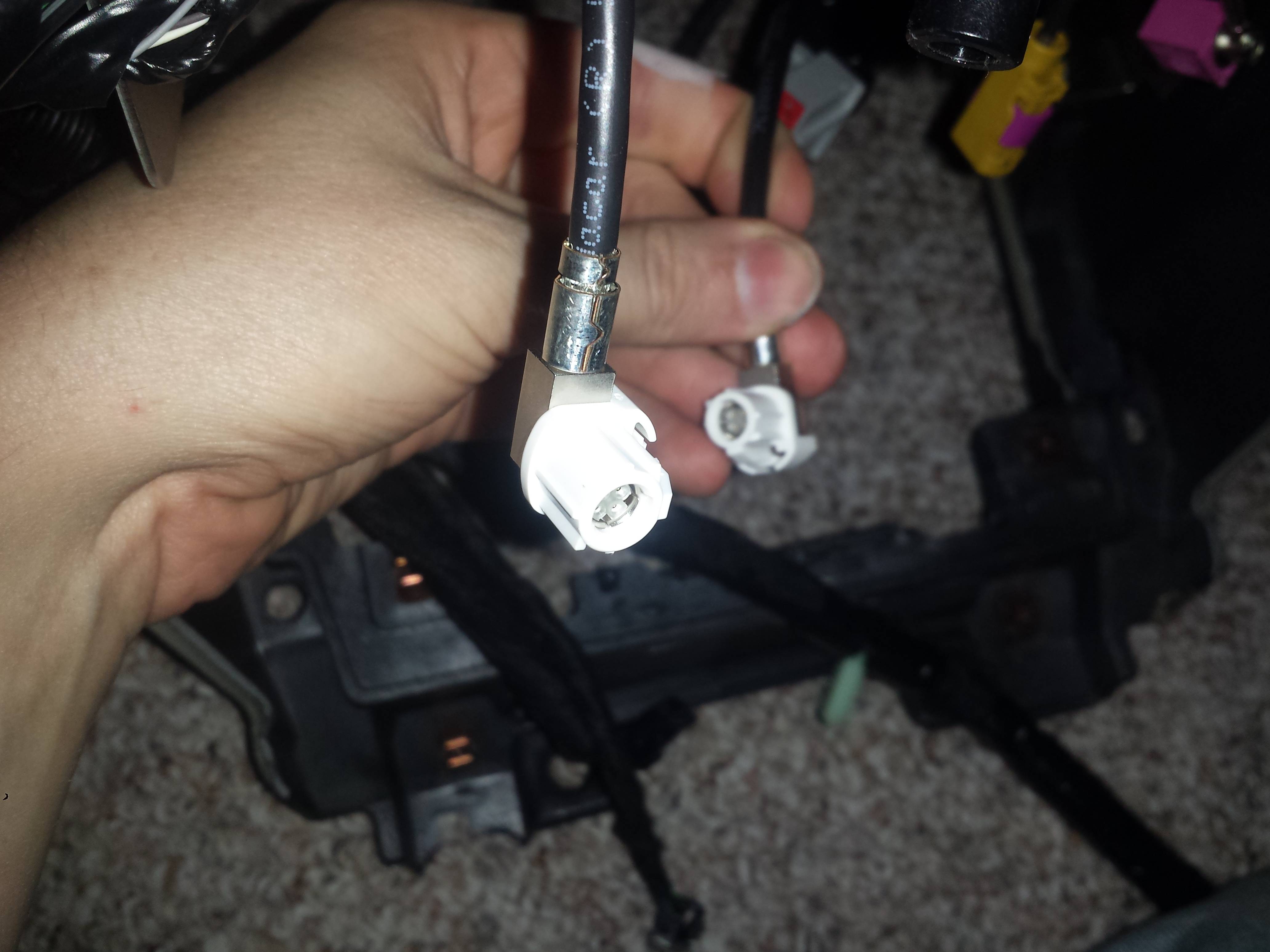
Part Description: AM/FM Str/CD/Clk/Navig System ; Low Voltage Differential Signal (LVDS) Four-Pin Cable....lol saw it on fordparts.com and it does look like it is its own cable and looking at the unit itself there are connections for it....
Thread Starter
Legacy TMS Member
Joined: November 7, 2006
Posts: 2,792
Likes: 58
From: Alberta
I did and using that list seems like it's meant for a Base Mustang. And that one would acquire parts from a recker. I have a shaker 500 on a GT premium and comfort package. So I already have steering wheel controls and I seem to be missing one more cable that was not mentioned in the list. It's the GPS Display Unit Cable (10E929) or
Part Description: AM/FM Str/CD/Clk/Navig System ; Low Voltage Differential Signal (LVDS) Four-Pin Cable....lol saw it on fordparts.com and it does look like it is its own cable and looking at the unit itself there are connections for it....
Part Description: AM/FM Str/CD/Clk/Navig System ; Low Voltage Differential Signal (LVDS) Four-Pin Cable....lol saw it on fordparts.com and it does look like it is its own cable and looking at the unit itself there are connections for it....