


Dash radio display clear plastic replacement?


Thread Starter
V6 Member
Joined: July 1, 2012
Posts: 92
Likes: 0
From: NJ
 Dash radio display clear plastic replacement?
So I was cleaning the inside of my car the other day. I saw a "spot" on the where the time, radio, info, etc. would be on the center console. I thought I had got something sticky on it but in reality that spot was actually what I'm now assuming as being a spot of the tint on that piece of plastic that somehow got removed. Stupid me I started scrubbing it with some glass cleaner and a microfiber cloth and I totally ruined it. Most of the tint is now removed and it just looks like crap now and there are a billion scratches and marks.
I'm attaching some pictures to show how bad it looks in the sun. Now I was wondering how I could go about to fix this. I had found a thread somewhere about a person who was making glass replacements for $15 which were much better than the stock plastic, but they're not making them anymore. If anyone knows something I could do to fix it that would be great. I don't know what to even classify or call that piece to find it online. Any help would be greatly appreciated. Thanks!
I'm attaching some pictures to show how bad it looks in the sun. Now I was wondering how I could go about to fix this. I had found a thread somewhere about a person who was making glass replacements for $15 which were much better than the stock plastic, but they're not making them anymore. If anyone knows something I could do to fix it that would be great. I don't know what to even classify or call that piece to find it online. Any help would be greatly appreciated. Thanks!


Bullitt Member

Joined: February 27, 2012
Posts: 229
Likes: 1
you have to make a piece from a cut piece of glass and car tint. The link to the walkthrough is http://www.allfordmustangs.com/forum...lay-glass.html
Lowes cuts glass for you. I went in there and gave the associate the dimensions and it fit great. Be sure to give the tint time to dry from your solution (overnight) before installing. Or use a hairdryer
Lowes cuts glass for you. I went in there and gave the associate the dimensions and it fit great. Be sure to give the tint time to dry from your solution (overnight) before installing. Or use a hairdryer
Last edited by SlowRiderr; Jan 8, 2013 at 02:38 PM.

Tasca Super Boss 429 Member
Joined: July 7, 2012
Posts: 4,421
Likes: 21
From: Indianapolis
Sorry to hear about your display.
For everyone else, your display is one of the most fragile things of your interior. Your display should never be touched by anyones hands. I know it's tempting when you have dust, dirt, sneeze, or whatever to just wipe it off with your fingers, napkin, spit, shirt....This is what causes the scratches. The scratches show up in the sun and look like crap. Your gauge cluster is no exception either.
I've had enough cars to figure out as well that glass cleaner will destroy certain displays and tints. The cheaper the brand, the more alcohol in it. I don't use window cleaner of any type on the display. I blow the dust off with air and GENTLY work a thin coat of Meguiars liquid wax over the display. Be careful not to get wax in the crevices of the surround. I use only the softest clean microfiber towel.
If you have a few light scratches, you can use some scratch x 2.0 to diminish them before the wax is applied. You gently coat the display in one horizontal swipe. Do not scrub, swirl, or try to work the polish or wax in. NO ELBOW GREASE! Simply coating the display lightly will protect and diminish scratches.
Remember to always use light pressure.
In the future, Remember to NOT touch that display no matter what until you can sit down and tend to it the correct way.
Hope this helps someone.
Note: notice the grain of rice size amount of wax on the microfiber towel. That's all you need.
For everyone else, your display is one of the most fragile things of your interior. Your display should never be touched by anyones hands. I know it's tempting when you have dust, dirt, sneeze, or whatever to just wipe it off with your fingers, napkin, spit, shirt....This is what causes the scratches. The scratches show up in the sun and look like crap. Your gauge cluster is no exception either.
I've had enough cars to figure out as well that glass cleaner will destroy certain displays and tints. The cheaper the brand, the more alcohol in it. I don't use window cleaner of any type on the display. I blow the dust off with air and GENTLY work a thin coat of Meguiars liquid wax over the display. Be careful not to get wax in the crevices of the surround. I use only the softest clean microfiber towel.
If you have a few light scratches, you can use some scratch x 2.0 to diminish them before the wax is applied. You gently coat the display in one horizontal swipe. Do not scrub, swirl, or try to work the polish or wax in. NO ELBOW GREASE! Simply coating the display lightly will protect and diminish scratches.
Remember to always use light pressure.
In the future, Remember to NOT touch that display no matter what until you can sit down and tend to it the correct way.
Hope this helps someone.
Note: notice the grain of rice size amount of wax on the microfiber towel. That's all you need.

Mach 1 Member
Joined: September 27, 2013
Posts: 684
Likes: 4
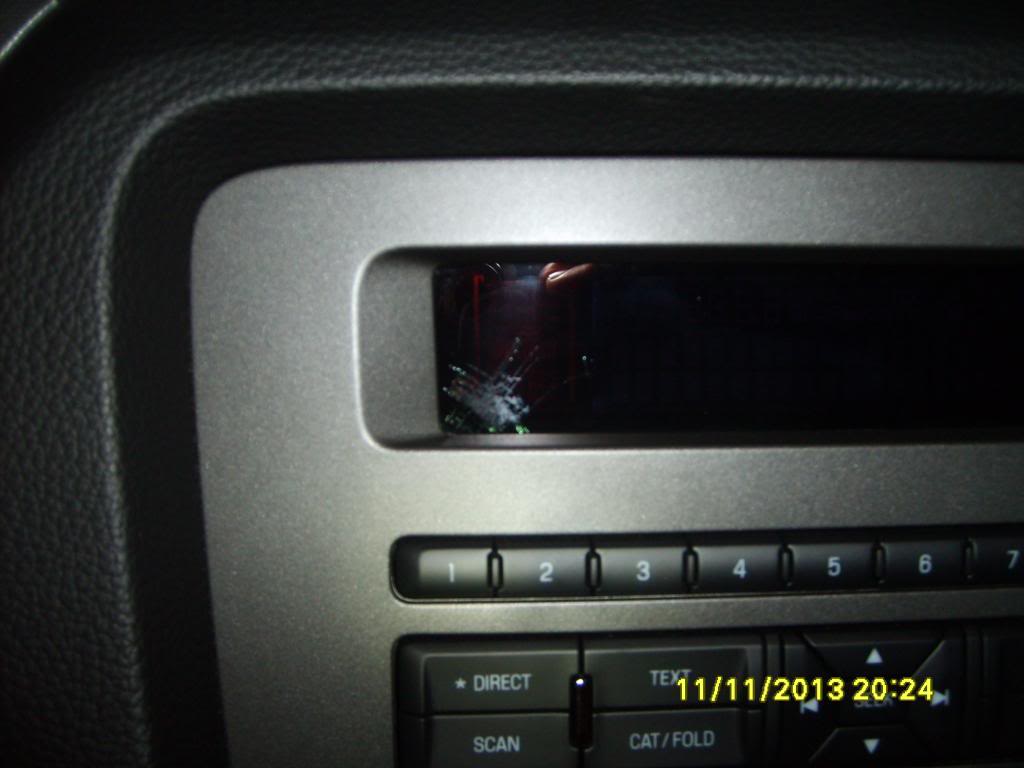
My display screen is messed up on my 2014 GT. It started as a thin line in the bottom left hand corner and now it has grown and looks almost like shattered glass. I took it to the dealer and they took a picture and will send it to ford to see if it's covered under warranty. They said it looks like the screen has been hit and is why it looks like that and it might not be covered under warranty. I call BS because I have never hit it and I bought the car new. I guess I will find out on Monday.
I wish the guy on allfordmustangs was still making glass replacements because I would just buy one of those and install it myself.
Wayne
I wish the guy on allfordmustangs was still making glass replacements because I would just buy one of those and install it myself.
Wayne

V6 Member
Joined: April 17, 2010
Posts: 82
Likes: 0
From: South Florida
Dash radio display clear plastic replacement?
I have an extra one that I will give you for just the cost of shipping and envelope. I bought a used display that I use for test fitting for my kits. PM me with your address.
Dennis

I have an extra one that I will give you for just the cost of shipping and envelope. I bought a used display that I use for test fitting for my kits. PM me with your address.
Dennis
Last edited by 5th Stang; Nov 9, 2013 at 04:59 AM.



Legacy TMS Member
Joined: March 7, 2010
Posts: 993
Likes: 2
From: Texas
Sorry to hear about your display.
For everyone else, your display is one of the most fragile things of your interior. Your display should never be touched by anyones hands. I know it's tempting when you have dust, dirt, sneeze, or whatever to just wipe it off with your fingers, napkin, spit, shirt....This is what causes the scratches. The scratches show up in the sun and look like crap. Your gauge cluster is no exception either.
I've had enough cars to figure out as well that glass cleaner will destroy certain displays and tints. The cheaper the brand, the more alcohol in it. I don't use window cleaner of any type on the display. I blow the dust off with air and GENTLY work a thin coat of Meguiars liquid wax over the display. Be careful not to get wax in the crevices of the surround. I use only the softest clean microfiber towel.
If you have a few light scratches, you can use some scratch x 2.0 to diminish them before the wax is applied. You gently coat the display in one horizontal swipe. Do not scrub, swirl, or try to work the polish or wax in. NO ELBOW GREASE! Simply coating the display lightly will protect and diminish scratches.
Remember to always use light pressure.
In the future, Remember to NOT touch that display no matter what until you can sit down and tend to it the correct way.
Hope this helps someone.
Note: notice the grain of rice size amount of wax on the microfiber towel. That's all you need.
For everyone else, your display is one of the most fragile things of your interior. Your display should never be touched by anyones hands. I know it's tempting when you have dust, dirt, sneeze, or whatever to just wipe it off with your fingers, napkin, spit, shirt....This is what causes the scratches. The scratches show up in the sun and look like crap. Your gauge cluster is no exception either.
I've had enough cars to figure out as well that glass cleaner will destroy certain displays and tints. The cheaper the brand, the more alcohol in it. I don't use window cleaner of any type on the display. I blow the dust off with air and GENTLY work a thin coat of Meguiars liquid wax over the display. Be careful not to get wax in the crevices of the surround. I use only the softest clean microfiber towel.
If you have a few light scratches, you can use some scratch x 2.0 to diminish them before the wax is applied. You gently coat the display in one horizontal swipe. Do not scrub, swirl, or try to work the polish or wax in. NO ELBOW GREASE! Simply coating the display lightly will protect and diminish scratches.
Remember to always use light pressure.
In the future, Remember to NOT touch that display no matter what until you can sit down and tend to it the correct way.
Hope this helps someone.
Note: notice the grain of rice size amount of wax on the microfiber towel. That's all you need.

Mach 1 Member
Joined: September 27, 2013
Posts: 684
Likes: 4
I have not personally taken everything apart but the part you show above looks like it actually attaches to the radio itself, not to the plastic dash cover. Let me know for sure.
Wayne
Mach 1 Member
Joined: September 27, 2013
Posts: 684
Likes: 4
I forgot to mention that I did hear back from the dealer today and Ford did in fact deny warranty coverage for the screen saying it looked like it had been hit. It's total BS because it has never been hit while in my possession. Not impressed with Ford at the moment. I hate to think what will happen with something that is really important.
I did check with the parts department and you have to buy the entire front panel with the screen already mounted in it for around $110 depending on which one I need. That is not going to happen so I have a line on a website(tapplastics.com) that will custom cut and tint a piece of acrylic if I need to go that route so I can fix this myself.
Wayne
I did check with the parts department and you have to buy the entire front panel with the screen already mounted in it for around $110 depending on which one I need. That is not going to happen so I have a line on a website(tapplastics.com) that will custom cut and tint a piece of acrylic if I need to go that route so I can fix this myself.
Wayne
Mach 1 Member
Joined: September 27, 2013
Posts: 684
Likes: 4
Here is a picture of what mine looks like. Its the best picture I could take. It started with a thin line and has spread to this and seems to get bigger every time I drive the car which is once or twice a week.

Last edited by 70monte; Nov 11, 2013 at 05:10 PM.

Member
Joined: March 29, 2013
Posts: 44
Likes: 0
Excellent read on this same issue-I replaced mine shortly after I found this thread;
http://www.allfordmustangs.com/forum...lay-glass.html
http://www.allfordmustangs.com/forum...lay-glass.html

Mach 1 Member
Joined: April 17, 2013
Posts: 678
Likes: 5
From: Hickory Creek, TX
Just an FYI, the cause of the "spot" shown by 70monte is delamination of the hardcoating- and it is definitely a manufacturer defect. If you try to "clean" the spot, you'll just cause more of the hardcoating to flake off- making the problem worse.
If you can't or won't replace the plastic with glass, you might be able to get all the hardcoating off by removing the piece and submersing it in an ultrasonic tank (like the ones used to clean jewelry). Your local optician may have one. Of course then you have an uncoated lens on your radio.
Sadly, the defective hardcoating is probably going to cause more problems than scratching would have.
(I work in the ophthalmic business and deal with thin film coatings- the cause of the delamination is probably the heating and cooling cycles that an automotive interior is subjected to.)
If you can't or won't replace the plastic with glass, you might be able to get all the hardcoating off by removing the piece and submersing it in an ultrasonic tank (like the ones used to clean jewelry). Your local optician may have one. Of course then you have an uncoated lens on your radio.
Sadly, the defective hardcoating is probably going to cause more problems than scratching would have.
(I work in the ophthalmic business and deal with thin film coatings- the cause of the delamination is probably the heating and cooling cycles that an automotive interior is subjected to.)
Mach 1 Member
Joined: September 27, 2013
Posts: 684
Likes: 4
I ordered a piece of tinted Acrylic from the tapplastics.com website I mentioned above. It has shipped today so I should get it by next Monday according to the tracking #. I will post a picture of it when I get it and give my impression of it.
For anyone who is interested, I ordered a Solar Grey transparent Acrylic sheet that was 1/8" thick, 7 5/16" long and 2" wide. I wanted something a little thinner but 1/8" was the thinnest you could get but talking to the person who gave me the website, he said that it would fit so hopefully he is right.
I used the same measurements that the OP in the thread that arazor above posted used for his glass replacements other than the thickness. It cost me $24.25 shipped which seems kind of high for a piece of plastic but it's cheaper than buying the entire front panel.
Wayne
For anyone who is interested, I ordered a Solar Grey transparent Acrylic sheet that was 1/8" thick, 7 5/16" long and 2" wide. I wanted something a little thinner but 1/8" was the thinnest you could get but talking to the person who gave me the website, he said that it would fit so hopefully he is right.
I used the same measurements that the OP in the thread that arazor above posted used for his glass replacements other than the thickness. It cost me $24.25 shipped which seems kind of high for a piece of plastic but it's cheaper than buying the entire front panel.
Wayne

Tasca Super Boss 429 Member
Joined: July 7, 2012
Posts: 4,421
Likes: 21
From: Indianapolis
Mach 1 Member
Joined: September 27, 2013
Posts: 684
Likes: 4
I'm wondering if heat has anything to do with this problem spreading. When the car is at home, it is under a carport that doesn't allow sun on the car but when I take it to work, it sits outside all day in the sun and it gets pretty hot inside. That is the only way I can see that this could spread. Deysha the Ford rep on here took my information and someone from Ford called me today while I was at work. I have to call back tomorrow and maybe I will get something done by Ford. We shall see.
Wayne
Wayne

NOT CURRENTLY ACTIVE ON THIS SITE! DO NOT USE PM FEATURE!
Joined: October 25, 2010
Posts: 5,279
Likes: 16
From: Dearborn, MI
I'm wondering if heat has anything to do with this problem spreading. When the car is at home, it is under a carport that doesn't allow sun on the car but when I take it to work, it sits outside all day in the sun and it gets pretty hot inside. That is the only way I can see that this could spread. Deysha the Ford rep on here took my information and someone from Ford called me today while I was at work. I have to call back tomorrow and maybe I will get something done by Ford. We shall see.
Deysha
Mach 1 Member
Joined: September 27, 2013
Posts: 684
Likes: 4
Deysha, I will let you know what happens. I posted what my conversation was with the customer service guy from Ford on the post in the Warranty and Service issue section of this forum. He said he will get back with me at some point when he finds out more information from the dealer. Thanks again.
Wayne
Wayne