


Radio Controlled Ipod Interface

Thread Starter
Administrator clevparts@aol.com

Joined: November 27, 2004
Posts: 12,515
Likes: 4,279
From: Visalia Ca.
Radio Controlled Ipod Interface
Here is a Long Awaited Radio Controlled Ipod Interface By Brandmotion! Below is Mustang Install Instructions and Application Chart. More Pics and Info to Follow! These can be purchased Direct from the Manufacturer But I will be Offering them at The Mustang Source Discount Price Very Soon. They will be Listed in my Sirius / Nav Hotsheets. I have an Early production Model in my Shelby Gt-500 and am Very Pleased with The Product and the Ease of the Installation. Please Feel Free to ask questions and I will answer as best I can. Also my Contact at Brandmotion is the General Manager so I am Sure I can get the answers you need.
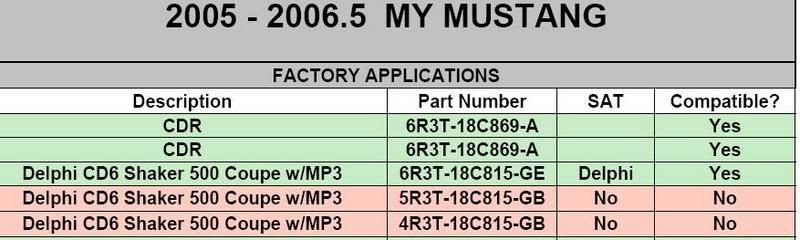
{Note} Use the Printed Pages Below to check for Radio Part Number Retrieval.
{Note} Use the Printed Pages Below to check for Radio Part Number Retrieval.
Thread Starter
Administrator clevparts@aol.com
Joined: November 27, 2004
Posts: 12,515
Likes: 4,279
From: Visalia Ca.
iPod® Direct Connect Adapter
Brandmotion now has the most integrated iPod® solution for your Ford, Lincoln & Mercury vehicle.
VehicleModel YearLocation of Satellite Tuner BoxPart #Edge/MKX2007-08Rear sill of hatch, driver sideIPDCFD002Expedition/Navigator2007-08Center console, armrestIPDCFD003Explorer/Mountaineer2006-08Pass side kick panel, near glove boxIPDCFD003F-150/Mark LT*2005-08Underneath radio, HVAC bezelIPDCFD003Five Hundred/Taurus/
Montego/Sable2006-08Trunk, driver side panel behind carpetIPDCFD002Freestyle/Taurus X2006-08Behind quarter panel trim, pass sideIPDCFD002Fusion/Milan/Zephyr/MKZ2006-08Behind rear seat side bolster, pass sideIPDCFD002Mustang*2005-08Trunk, behind carpet pass sideIPDCFD002Sport Trac2007-08Pass side kick panel, near glove boxIPDCFD003Super Duty**2006-08Underneath steering columnIPDCFD003 Vehicles Without Satellite Radio
VehicleModel YearLocation of Satellite Tuner BoxPart #Edge/MKX2007-08No Satellite RadioIPDCFD001Expedition/Navigator2007-08No Satellite RadioIPDCFD001Explorer/Mountaineer2006-08No Satellite RadioIPDCFD001F-150/Mark LT*2005-08No Satellite RadioIPDCFD001Five Hundred/Taurus/
Montego/Sable2006-08No Satellite RadioIPDCFD001Freestyle/Taurus X2006-08No Satellite RadioIPDCFD001Fusion/Milan/Zephyr/MKZ2006-08No Satellite RadioIPDCFD001Mustang*2005-08No Satellite RadioIPDCFD001Sport Trac2007-08No Satellite RadioIPDCFD001Super Duty**2006-08No Satellite RadioIPDCFD001Focus2006-08No Satellite RadioIPDCFD001
Brandmotion now has the most integrated iPod® solution for your Ford, Lincoln & Mercury vehicle.
- Works with all Ford, Lincoln & Mercury factory satellite-ready radios, with or without satellite service*
- Total iPod menu control on Ford factory radio
- iPod works seamlessly with factory steering controls
- iPod charges while in use
- Simple installation in most models
- Never any wire cutting or alterations to your vehicle
- Controls on our radio perform the identical actions on your iPod – fwd, rev, seek, scan, menu, etc.
- Full radio display of artist, album, and song – each new song title scrolls across the display.
VehicleModel YearLocation of Satellite Tuner BoxPart #Edge/MKX2007-08Rear sill of hatch, driver sideIPDCFD002Expedition/Navigator2007-08Center console, armrestIPDCFD003Explorer/Mountaineer2006-08Pass side kick panel, near glove boxIPDCFD003F-150/Mark LT*2005-08Underneath radio, HVAC bezelIPDCFD003Five Hundred/Taurus/
Montego/Sable2006-08Trunk, driver side panel behind carpetIPDCFD002Freestyle/Taurus X2006-08Behind quarter panel trim, pass sideIPDCFD002Fusion/Milan/Zephyr/MKZ2006-08Behind rear seat side bolster, pass sideIPDCFD002Mustang*2005-08Trunk, behind carpet pass sideIPDCFD002Sport Trac2007-08Pass side kick panel, near glove boxIPDCFD003Super Duty**2006-08Underneath steering columnIPDCFD003 Vehicles Without Satellite Radio
VehicleModel YearLocation of Satellite Tuner BoxPart #Edge/MKX2007-08No Satellite RadioIPDCFD001Expedition/Navigator2007-08No Satellite RadioIPDCFD001Explorer/Mountaineer2006-08No Satellite RadioIPDCFD001F-150/Mark LT*2005-08No Satellite RadioIPDCFD001Five Hundred/Taurus/
Montego/Sable2006-08No Satellite RadioIPDCFD001Freestyle/Taurus X2006-08No Satellite RadioIPDCFD001Fusion/Milan/Zephyr/MKZ2006-08No Satellite RadioIPDCFD001Mustang*2005-08No Satellite RadioIPDCFD001Sport Trac2007-08No Satellite RadioIPDCFD001Super Duty**2006-08No Satellite RadioIPDCFD001Focus2006-08No Satellite RadioIPDCFD001
 It is compatible with the new 160GB iPod Classic model, correct?

Member
Joined: November 13, 2005
Posts: 14
Likes: 0
I want one too! My 2006 GT Coupe's factory radio p/n is 6R3T-18C815-GE which is compatible per the "Consumer.pdf". I also have a factory Delphi Sirius unit Part Number 6L3T-18C963-AE which I installed myself and is mounted behind the dash. Which BrandMotion unit will I need? The IPDCFD001, or the IPDCFD002 or the IPDCFD003?

Thread Starter
Administrator clevparts@aol.com
Joined: November 27, 2004
Posts: 12,515
Likes: 4,279
From: Visalia Ca.

Thread Starter
Administrator clevparts@aol.com
Joined: November 27, 2004
Posts: 12,515
Likes: 4,279
From: Visalia Ca.
2. The Brandmotion Unit is more Sophisticated and has More Features to Find the Music on your Ipod. The TTA Unit only Uses the Seek Button which would take additional time to find your Tunes! The Brandmotion Unit also uses the Up and Down button. It is Just More User Friendly!
3. The Trip Tunes Advanced does not work with Nav units.

GT Member
Joined: October 13, 2004
Posts: 171
Likes: 3
From: Greenville, SC
I've been waiting for this, but here is the puzzle: I have an 06 GT Coupe built on 9/23/2005. The part number for my headunit is 6R3T-18C815-GD (rather than GE). Am I compatible or not? I'm also looking to add the factory sat radio.
Member
Joined: September 19, 2007
Posts: 9
Likes: 0
"I want one too! My 2006 GT Coupe's factory radio p/n is 6R3T-18C815-GE which is compatible per the "Consumer.pdf". I also have a factory Delphi Sirius unit Part Number 6L3T-18C963-AE which I installed myself and is mounted behind the dash. Which BrandMotion unit will I need? The IPDCFD001, or the IPDCFD002 or the IPDCFD003?"
You'll want the IPDCFD003 to connect between the sat receiver & the harness that goes back to the vehicle / radio.
You'll want the IPDCFD003 to connect between the sat receiver & the harness that goes back to the vehicle / radio.
Member
Joined: September 19, 2007
Posts: 9
Likes: 0
Early build '06 iPod
Getting to the radio isn't the easiest job in the world, so if you do purchase an adapter, be sure to test it before you button everything back up. If you do purchase, please let us know what results you get.
GT Member
Joined: October 13, 2004
Posts: 171
Likes: 3
From: Greenville, SC
Dean:
Thanks for this. I can guarantee you the the letter in my headunit's part number is a D rather than an E--I've had three other folks look at it and it is similar to the D indicated by the radio for song titles, etc.
I am hoping that the adapter will work with this radio, as I have not had any trouble with it (e.g., skipping, MP3 issues, blanking out). I will, however, certainly take your advice and test the adaptor before putting everything back together, and I will keep you posted.
Thanks again!
Thanks for this. I can guarantee you the the letter in my headunit's part number is a D rather than an E--I've had three other folks look at it and it is similar to the D indicated by the radio for song titles, etc.
I am hoping that the adapter will work with this radio, as I have not had any trouble with it (e.g., skipping, MP3 issues, blanking out). I will, however, certainly take your advice and test the adaptor before putting everything back together, and I will keep you posted.
Thanks again!
Thread Starter
Administrator clevparts@aol.com
Joined: November 27, 2004
Posts: 12,515
Likes: 4,279
From: Visalia Ca.
On a Side Note if you Have Installed The Factory Style Sirius and it works It's a given that the Ipod Adapter will Function. Also If you Plan on Adding Both The Sirius and The Ipod Adapter You Can Save Yourself Some Time By Doing Both at the Same Time.
KC
BTW, Welcome Dean from Brandmotion. I am appreciate you answering Some of the Questions. You will find the TMS People a great resource for Product Feedback.
KC
KC
BTW, Welcome Dean from Brandmotion. I am appreciate you answering Some of the Questions. You will find the TMS People a great resource for Product Feedback.
KC
Member
Joined: September 19, 2007
Posts: 9
Likes: 0
The Nav compatible kit has an "N" after the part number. It works with or without factory satellite receiver & comes with the harness to connect to the radio. The kit is referred to as the DC PLUS.
Nav radio w/out sirius - IPDCFD001N
Nav radio + sirius / long harness (factory installed sat) - IPDCFD002N
Nav radio + sirius / short harness (factory sat / aftermarket install near radio) - IPDCFD003N
Team Mustang Source
Joined: September 14, 2005
Posts: 3,477
Likes: 1
From: SoCal
This is probably a really dumb question....
I checked my radio's # (2007 Shaker 1000) and it's same number as in the pdf so it looks like it's compatible.
Do I go to the brandmotion site to purchase or get the hotsheet from Kevin ??
Also does the interface keep the iPod charged or does it charge the iPod ?
Thanks For this. It is exactly the type of interface that I have been looking for.
I checked my radio's # (2007 Shaker 1000) and it's same number as in the pdf so it looks like it's compatible.
Do I go to the brandmotion site to purchase or get the hotsheet from Kevin ??
Also does the interface keep the iPod charged or does it charge the iPod ?
Thanks For this. It is exactly the type of interface that I have been looking for.