


Raxiom Navigation: adding a front bumper camera

Thread Starter
V6 Member
Joined: December 23, 2012
Posts: 58
Likes: 0
From: vancouver b.c.
Raxiom Navigation: adding a front bumper camera
I have the Raxiom Navigation. In addition to the supplied back up camera it comes with, I installed a front bumper camera and after wiring everything up, it works good. I have the front camera plugged into the av input. As soon as I release the parking brake, message comes on to the screen saying I cannot view while driving. Fail. The whole point of me installing a front camera in the first place was to see how much room I have for parking curbs when pulling in front first.
Thread Starter
V6 Member
Joined: December 23, 2012
Posts: 58
Likes: 0
From: vancouver b.c.
Ok, I just tried it again and it works. So weird. Switched it to av input and front camera came onto the screen, released parking brake and message came up for about 5 seconds, started driving to see if the video would cut out but it didn't. I thought I had to do some modify to the parking brake to send a signal to the unit but I guess not. Maybe I have some loose wiring somewhere.


Thread Starter
V6 Member
Joined: December 23, 2012
Posts: 58
Likes: 0
From: vancouver b.c.
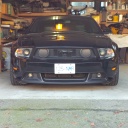
I mounted the front camera recessed in the lower grill using 3m automotive double sided tape. From 2-3 feet away, you can't even tell it's there.
Last edited by rockpolisher; Apr 27, 2014 at 02:02 PM.
Thread Starter
V6 Member
Joined: December 23, 2012
Posts: 58
Likes: 0
From: vancouver b.c.
Thanks. It's just a generic back up camera I picked up at my local audio shop. Camera is a brand called Betoptek. You are right, it looks just like the camera the raxiom navi came with but the bonus is that it is waterproof and has parking grid lines. I also picked a mini dash camera while I was there since it was on sale. I couldn't resist the size and shape and easy functionality of it.
Thread Starter
V6 Member
Joined: December 23, 2012
Posts: 58
Likes: 0
From: vancouver b.c.
I know it sounds like overkill but I now have a total of 3 camera's operational on my car. Rear view backup camera, front bumper camera, and front dash camera as a reliable eye witness if anything ever happens.

Thread
Thread Starter
Forum
Replies
Last Post