


Garage Door Opener in Visor.

Thread Starter
GT Member

Joined: March 21, 2014
Posts: 164
Likes: 4
From: Alabama
 Garage Door Opener in Visor.
Do any of you have any experience programing the remote built into the visor with Wayne Dalton Garage door openers?
I have tried the instructions in the manual and cant get it to work. I am currently searching the net for better instructions but havent had any luck yet.
Anything special any of you had to doo to get yours working?Like standing on your head, spinning counter clockwise while saying the pledge of allegiance?
UPDATE:
I figured it out. Below are the steps I did with some pics. Hopefully it will help some that are having issues
1. Make sure you car is parked as close to the grage door opener as possible.
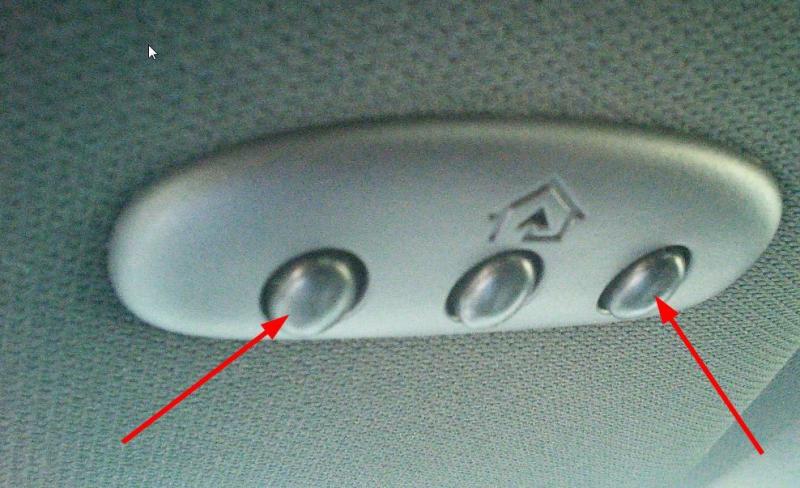
2. Erase any codes that may currently be in the homelink device. Do this by pressing and holding both the outer homelink buttons for 20 sec. until the red light over the middle button blinks rapidly.
3. After the codes are deleted. Take your existing garage door opener (handheld in my case) and hold it 1-2 inches away from the homelink device and simultaneously press the button to operate the door on the handheld device and the button on the visor that you want to program (In my case it was the middle button) until the red light on the homelink device blinks rapidly.
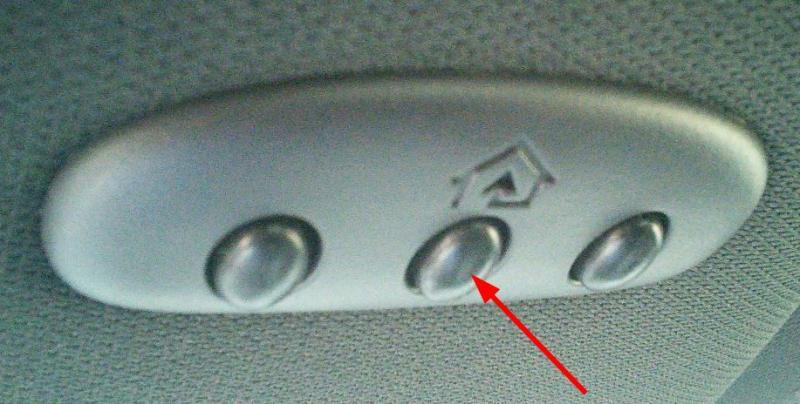
This programs the homelink button to the HANDHELD device, not the Actual garage door opener.
4. Go to the Garage door opener itself and locate the Program/Learn button
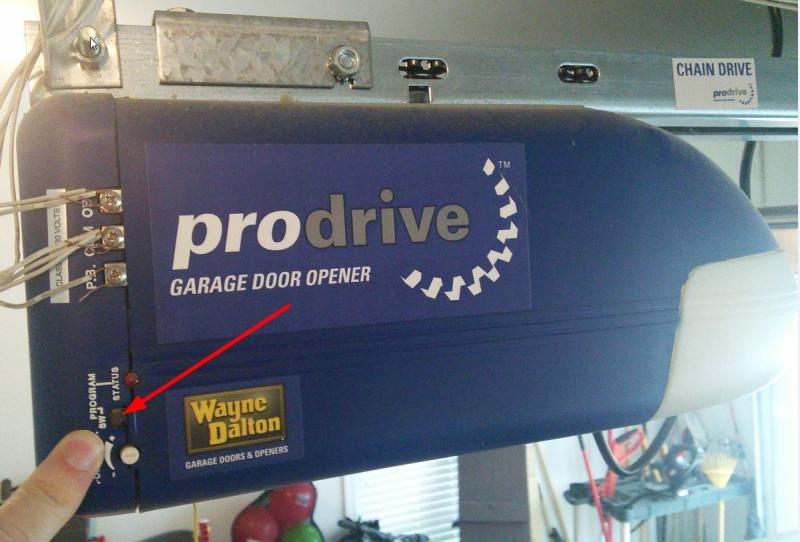
5. Press this button once (for my wayne dalton model) and the Status light and over head light will come on and stay on.
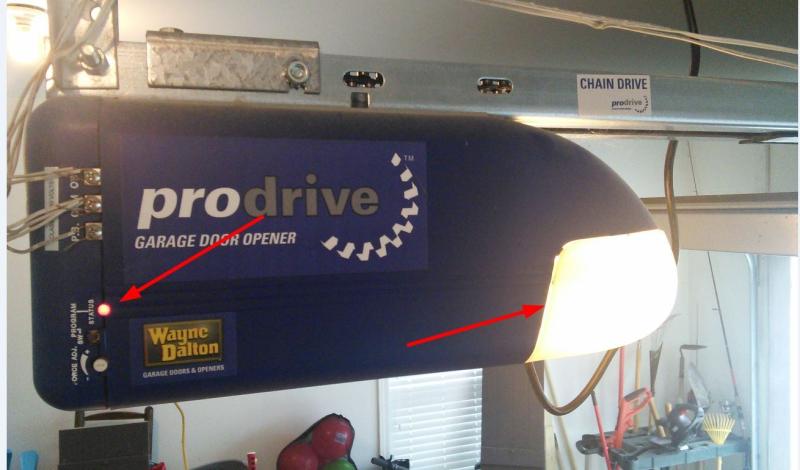
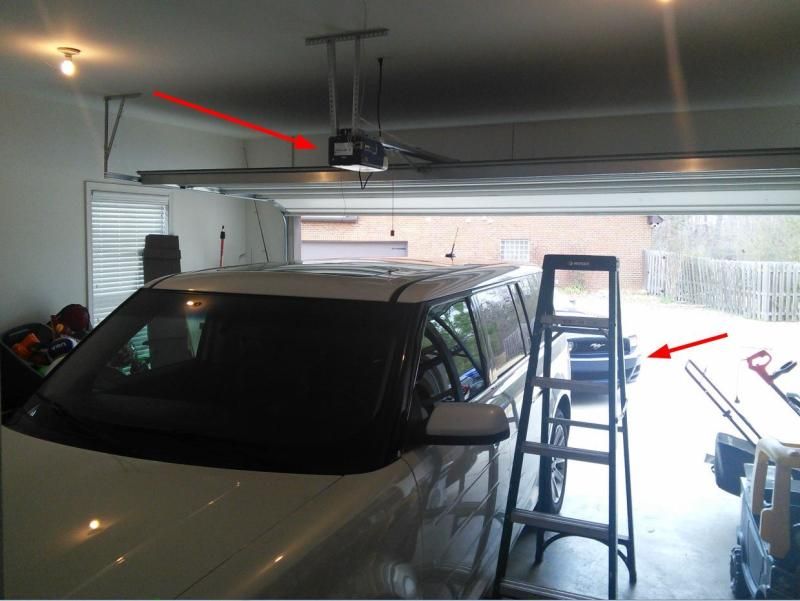
6. You now have 30 seconds to go back to your car and press and hold the button you programed earlier. When complete the garage door light (pictured above) will flash three times and the door will operate.
Your homelink device is will now operate your door.
I know not all garage door openers will work in the same fashion but I feel this may be a common procedure with a lot of them.
Hope this helps!!
I have tried the instructions in the manual and cant get it to work. I am currently searching the net for better instructions but havent had any luck yet.
Anything special any of you had to doo to get yours working?Like standing on your head, spinning counter clockwise while saying the pledge of allegiance?
UPDATE:
I figured it out. Below are the steps I did with some pics. Hopefully it will help some that are having issues
1. Make sure you car is parked as close to the grage door opener as possible.
2. Erase any codes that may currently be in the homelink device. Do this by pressing and holding both the outer homelink buttons for 20 sec. until the red light over the middle button blinks rapidly.
3. After the codes are deleted. Take your existing garage door opener (handheld in my case) and hold it 1-2 inches away from the homelink device and simultaneously press the button to operate the door on the handheld device and the button on the visor that you want to program (In my case it was the middle button) until the red light on the homelink device blinks rapidly.
This programs the homelink button to the HANDHELD device, not the Actual garage door opener.
4. Go to the Garage door opener itself and locate the Program/Learn button
5. Press this button once (for my wayne dalton model) and the Status light and over head light will come on and stay on.
6. You now have 30 seconds to go back to your car and press and hold the button you programed earlier. When complete the garage door light (pictured above) will flash three times and the door will operate.
Your homelink device is will now operate your door.
I know not all garage door openers will work in the same fashion but I feel this may be a common procedure with a lot of them.
Hope this helps!!
Last edited by SouthernStang79; Mar 2, 2015 at 02:32 PM.


Bullitt Member
Joined: October 3, 2012
Posts: 499
Likes: 0
From: Near Chattanooga, TN
Call the number is your owners manual regarding the universal garage door opener, they will assist you or you may have to order the module that connect to your garage door opener motor, thats what I had to do. Trust me its not you its the lack of the module on the power unit.

V6 Member
Joined: March 5, 2013
Posts: 60
Likes: 0
From: advance nc,calabash nc
Do any of you have any experience programing the remote built into the visor with Wayne Dalton Garage door openers?
I have tried the instructions in the manual and cant get it to work. I am currently searching the net for better instructions but havent had any luck yet.
Anything special any of you had to doo to get yours working?Like standing on your head, spinning counter clockwise while saying the pledge of allegiance?
I have tried the instructions in the manual and cant get it to work. I am currently searching the net for better instructions but havent had any luck yet.
Anything special any of you had to doo to get yours working?Like standing on your head, spinning counter clockwise while saying the pledge of allegiance?

Cobra Member
Joined: October 11, 2009
Posts: 1,126
Likes: 4
guys if ur garage door opener is older than 4 years u need a module to hook up to ur main unit, the company that makes these for ford is called car2u
Last edited by HizliBullet; Feb 24, 2015 at 11:56 PM.
V6 Member
Joined: December 19, 2014
Posts: 55
Likes: 0
guys if ur garage door opener is older than 4 years u need a module to hook up to ur main unit, the company that makes these for ford is called car2u
Universal Garage Door Opener: Car2U for Rolling Code Transmitter│Ford How-To Video - YouTube
Universal Garage Door Opener: Car2U for Rolling Code Transmitter│Ford How-To Video - YouTube

Member
Joined: February 25, 2015
Posts: 3
Likes: 0
I couldn't get it to work once I synchronized the one in my car to the portable opener that came with my garage door opener. The directions in the owners manual for the mustang advise you to find the pairing/sync button on you garage door opener and follow the directions that came with it to finalize pairing to you car. It's not Ford, it's your garage door opener that won't allow the portable door opener to be copied and used to open the door without manually pairing to your garage door opener. It's a security feature of the garage door opener. Mine works perfectly now. It just took a little longer.
Legacy TMS Member
Joined: August 18, 2013
Posts: 162
Likes: 8
From: Santa Fe,Texas
I have two Sears Craftsman door openers and got both to work on the first try.

Bullitt Member
Joined: July 24, 2014
Posts: 216
Likes: 2
From: Arizona
Why is it then, it took a few minutes to program my wife's 2014 traverse but I can't program mine. Something's not right!!! Oh, that's right Ford probably saved .50 cents a unit so they bought the one that doesn't work right!!! After spending hours on trying to pair them together, I won't waste another minute of my time.
It's not my garage door opener that's the problem, it's the fact that the unit is not universal enough, that's why some work and some don't. It doesn't take a rocket scientist to figure that out!!
It's not my garage door opener that's the problem, it's the fact that the unit is not universal enough, that's why some work and some don't. It doesn't take a rocket scientist to figure that out!!

NOT CURRENTLY ACTIVE ON THIS SITE! DO NOT USE PM FEATURE!
Joined: October 25, 2010
Posts: 5,279
Likes: 16
From: Dearborn, MI
Do any of you have any experience programing the remote built into the visor with Wayne Dalton Garage door openers?
I have tried the instructions in the manual and cant get it to work. I am currently searching the net for better instructions but havent had any luck yet.
Anything special any of you had to doo to get yours working?Like standing on your head, spinning counter clockwise while saying the pledge of allegiance?
I have tried the instructions in the manual and cant get it to work. I am currently searching the net for better instructions but havent had any luck yet.
Anything special any of you had to doo to get yours working?Like standing on your head, spinning counter clockwise while saying the pledge of allegiance?
If the video HizliBullet doesn’t help, additional system information can be found on-line at www.learcar2U.com or by calling the toll-free help line 1-866-572-2728. I hope this helps.
Deysha

Member
Joined: September 17, 2014
Posts: 34
Likes: 1
Why is it then, it took a few minutes to program my wife's 2014 traverse but I can't program mine. Something's not right!!! Oh, that's right Ford probably saved .50 cents a unit so they bought the one that doesn't work right!!! After spending hours on trying to pair them together, I won't waste another minute of my time.
It's not my garage door opener that's the problem, it's the fact that the unit is not universal enough, that's why some work and some don't. It doesn't take a rocket scientist to figure that out!!
It's not my garage door opener that's the problem, it's the fact that the unit is not universal enough, that's why some work and some don't. It doesn't take a rocket scientist to figure that out!!
Bullitt Member
Joined: July 24, 2014
Posts: 216
Likes: 2
From: Arizona
Glad yours worked but mine didn't and others haven't as well. I followed the directions verbatim. Not the kind of product I like to deal with. To your response about a GM product, at least it worked as advertised.


Post *****
Joined: October 9, 2007
Posts: 32,808
Likes: 163
I have a Liftmaster which is a Chamberlain just like Sears is too.
I couldn't get mine to work from the manual. I went online and still couldn't get it to work. Then after trying some different stuff and doing a little bit of both it finally worked. I have no idea how I did it and no idea how to program my other Ford.
I couldn't get mine to work from the manual. I went online and still couldn't get it to work. Then after trying some different stuff and doing a little bit of both it finally worked. I have no idea how I did it and no idea how to program my other Ford.